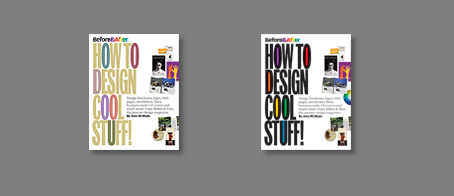
Critique our cover!

We’d like you to know that our third book, Before & After, How to Design Cool Stuff, will be in bookstores in time for Christmas. We were pleased to sign the contract with Peachpit, our favorite publisher, last Tuesday, the same day we learned that its cover must be finished by June 15.

This June 15. 

That’s Monday, people. 

So as I write, and in a sea of other projects, we’re running the how-fast-can-you-design-a-cover? drill for a book whose contents aren’t even finalized. No time to explore concepts; just get it on the page and see what happens.

So we could really use your eyes.

The cover is 7″ x 9″, same as our others. What I’d like is a reaction — a Yes, I like it, or, I’d pick that up, or, No, I don’t like it. Keep in mind that a book is viewed in two places — in the bookstore at close distance, where you can hold it and explore its contents easily, and online in low res at small sizes where its contents are more difficult to explore.

The job of the cover is to set the tone and pull you in.

Once you’ve let yourself react to it, feel free to say what you like or not about it.


book1forblog

(Click image for a full-size view)


Same thing but bold . . .

book2forblog


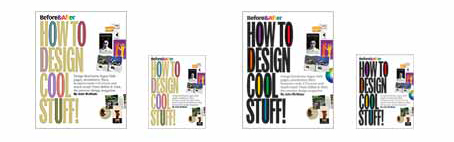
At Amazon size . . .

booksforblogamazonsize1


And how books actually look on Amazon . . .
booksforblogamazonsizewhite

We love reading your stuff! In this case, please keep your comments brief because, well . . . Monday.

—————

June 12, 5 p.m. Pacific Time. Comments closed.

A reader once wrote to me simply to say, “You’re a rich man, John McWade.” By which he was referring to the trust that so many of you have placed in me, and the fact that I can ask a simple question about my own work and so many are willing to help. Thank you ALL for taking the time to comment; your insights have enlightened me in several important ways. And stay tuned for a followup. With all the cross-currents in these waters, there will be a lot to discuss.


Tags: ,

648 Responses to “Critique our cover!”

  1. rich Graham

    I’d use a solid black title, but either lose or greatly lighten up the letter fills. Hard to read either one at amazon size.

  2. Betsey Binet

    The bolder version, hands down — plus, the color wheel is a good addition. I’d explain my choice, but you asked for brevity. Good luck!

  3. Landon Shipman

    What’s not to dig? Personally, I like them. If it was the first time I saw Before & After, I would buy it today!

    (The bolder one appears to meet the criteria better considering the Amazon aspect)

  4. Kriselle

    I like the first option much better than the second. The only problem is that it’s a little too light in color for the Amazon size.

  5. Barbara S

    The bold design sure works better at smaller sizes. In the lighter version, the Os and the Us seem to jump out and I keep trying to make a word out of them—OOOOU?

    Cool design as always. You are my design heros. I’ll be first in line to buy this book.

  6. coffeebeanzzz

    Um, not too thrilled. The art’s too far away, too small, out of proportion, and the bridge of words between the two doesn’t bring it together for me. Make the “How to Design Cool Stuff” the focal point, (maybe on an angle?); use the whole space and intersperse the art thoughout the title? Work it into the title, instead of having it sit across the table from it, not part of the action?

    Not in love with the filled in letterforms, either. Just clogs ups the scenery, IMHO. Maybe a reversed cover, black or red even, with the words and art, make it pop? Just my 2¢.

  7. KSC

    My eyes are definitely drawn to the bolder version of the cover. In muted version, especially at smaller views, I find myself trying to figure out the “hidden meaning” in the colored letters since they pop out the most. The title is secondary in the muted version. I also like the white background since so many books now have colored backgrounds. The empty space makes it stand out among the others.

  8. Sean

    Both are great, but have you considered a hybrid of the two? Maybe darker text (i.e. the second comp) and coloring the Os, Us, and D the bold colors, rather than filling in the bowls.

    Might just be me — I typically am not a fan of filling in bowls.

  9. Kelly Radu

    I like the bolder one, but I think it’s a little hard to read, especially at small size, and it seems a little cluttered.

  10. Tracy

    BOLD!! YES!

  11. R Weinman

    The bolder colors definitely draw you in…no doubt about it. If the two were on a shelf side by side I would go for the bold (I’m not not a pastel kind of person).

    Best of luck!

  12. SPitts

    I’d pick the second (bold) cover over the first.

  13. Helen

    I like the second cover design because it is bolder in color and design and would be easier to find when I’m looking for it in the bookstore. I love Peachpit books!

  14. Mimi Orth

    Both large and small, the bolder cover appeals more to me. It pulls from the colors in Before & After’s name and from the photos included on the cover. And it stands out, especially when small.

  15. M. Esmonde

    I like the bolder one. Seems truer to your long term identity. However it does not work as well at the small size. Perhaps the bold one but tone down the heaviness of the type just a little?

  16. Brian

    I like the bolder version (black lettering). However, both covers look a bit cluttered. Consider opening the leading on the subhead text.

    Also, maybe make Before & After logo larger and reduce the title copy, so that if the book winds up behind others the top will broadcast your name.

  17. Tad Davis

    The informational text looks forced, rather than designed, into the cover. And why a line break in the middle of “Web pages”? It’s unnecessary and confusing — reordering the list is an easy fix.

    I’m afraid that what “sets the tone” is that the cover itself isn’t a very good example of “cool stuff”.

  18. Dana

    Given your consistent message for simplicity in design, both covers have too many elements competing for attention to convey the message, especially in thumbnail format. The text in #2 stands out better, but I’d like it less dominant; #1 is way too neutral.

    Simplify! Keep it punchy and simple like to you do in your articles! You only have room for one message . . . say more with less.

  19. Deb Whittington

    The green type looks “prettier” but the bolder type scream the message in a way the subtle colours don’t.

    A bit concerned about the density, size and leading of the content para. Maybe bullet points baseline shifted to sit at x-height instead of commas to define the different material covered?

  20. James

    I definitely like the bold better — the softer colors are hard to read from the shelf and don’t match the “cool stuff” message for me. The beiges also have the same tonal values (to my eye) as the grey text, so it becomes a wash.

    That said, I’m not sure why you’ve filled in some letters — except for the sake of adding color. What’s so special about “OODOOU”? You’ve called attention those letters in BOTH designs, but they’re not important.

  21. Salman Sajid

    Hi John,

    My thoughts:

    1) Bolder is better: If I had to choose between the two designs, I would go with the bolder treatment. It’s in keeping with your logo and easier to read. Furthermore, I was distracted by the colored letters of the first one. I immediately tried to piece together the letters “O-O-D-O- O-U” to see if it spelled anything clever… (does it? :-)

    2) Representative graphic elements: I think graphic elements could be improved to be more representative of the book’s contents. For example, you say that this book also contains web page designs but I didn’t see a screenshot of any web pages on the cover.

    3) Centered layout: I know you’re short on time, but have you considered a centered layout? The image I have in my head is the font centered with a slight perspective that gives the impression that it was painted on the floor and the viewer is looking down on it. Then I would imagine seeing a lot more design pieces dropped around the title to convey the sense of variety and magnitude… as if someone had to brush away the well-designed “cool stuff” to see what was written underneath. This casual imagery would play well with the words “cool” and “stuff” of the title.

    Hope that helps.

    ~ Salman

    =-=-=-=-=-=-=-=-=-=-=-=-=-=-=-=-=
    Salman Sajid
    Sajid Creative
    http://www.sajid.com

  22. s haldeman

    definitely prefer the bold… the “subtle” leaves me absolutely cold. the kahki or whatever you call the beige color is so dull as to actually make me feel “off”…

  23. Teri Rider

    As a book designer, I think you have done a great job. You selected images from some of my favorite issues of DT, and the subtext says it all. I very much favor the darker version for several reasons, all of which you address in your post: readability in all sizes and formats.

    Nice work. I’ll be sure to pick up a copy or two when it becomes available.

    Keep up the good work.

  24. Jeff

    At Amazon size, no contest; the bold version is much more striking. In the thumbnail, the title becomes the negative space, and that feels odd.

  25. Lisa Livingston

    When I saw your first cover sample, I actually became annoyed, thinking — “Oh great. I hate when designers try to be cute in their presentations without having a valid reason for their design decisions.” But then I saw the second sample, and I instantly understood why you dropped color into the title. It fits, and my world once again enjoys a state of serenity and balance.

  26. Martha Khoury

    Initially I like the first, softer colors. BUT if you’re viewing it in Amazon size, the bolder is definitely king. And it looks fine big as well.

    I am visually bothered by where the colored ovals overlap the text…I’d either blacken the text or hide the ovals underneath.

  27. Carolyn Baggoo

    I love it!! But more so the bold.

  28. Craig

    Second, bolder one works better for small Amazon size

  29. Chris

    It’s okay. At first glance, it seems a little busy. The headline is big and bold, but I think there’s too many focal points pulling my eye. Simplify. Take pieces away until the cover doesn’t make sense anymore. Try that.

  30. Christine Gregory

    I prefer the first cover design, with the soft colors. The second design is so bold, that the title almost hurts my eyes to look at.

    Question: Why is “Web” capitalized? My eyes stayed stuck on that capital “W” as if I caught a typo.

    That’s my 2 cents. Can’t wait to buy the new book!

  31. Sharon Brown

    Really like the bold black type … more attention getting … and btw … I LOVE your online magazine … Sharon Brown

  32. Vanessa

    Definitely the black one. Grabs attention, and relates more to the word cool. The other light gold one has a nice colour scheme more meant for interior design books than for ‘cool’ and exclamation marks. :)

  33. Penny

    I like the subtle one, but I LOVE the bold one. It fits with the character of your logo better, and the book will attract attention from a distance as well as in tiny little Amazon ads. As always, wonderful work, John. I will be purchasing the book, of course.

  34. Don Cheke

    Go with the BOLD – its got grab

  35. Joan Auclair

    Definitely the bold one is the only legible version, especially at the smallest sizes.

    I think there’s too much of the “cool stuff” on the right. No focus, which makes it look not quite cool enough.

  36. Bill Fernandez

    (1) At first glance, looks like a B&A design. But then the contrast between the cohesiveness on the left, vs. the jumble on right, hits. It really doesn’t hang together as a single cohesive design.

    (2) The title in pastel looks more contemporary and designer-like but seems at present too tame. The bold title looks at present dated, like a West Side Story poster. Both impressions could change as the design evolves.

    FWIW and good luck!

  37. Mickey

    I personally like the first one, but from a marketing perspective I think the second one pops and would be more noticed on a newsstand.

  38. Judy Robertson

    Bold – yes

  39. Rich

    Bold, go bold, much better thumbnail. The lighter font color in the first option seems to disappear at the smaller sizes.

  40. Steph Barnard

    No contest: Go with the black text. It is easier to read on the computer screen and more catchy on the bookshelf.

  41. Tracey

    I must say the bold version is more striking, and it is much easier to read the title even at the small Amazon size. I am not a professional, but to me it just looks better as well

  42. John Maler

    Both are cool, but I’d use the black type. The title really “pops” out in black, and you’re looking to grab people’s attention on Amazon and anywhere else the book is sold. The muted tones will not grab people’s attention in my opinion.

  43. Regina

    I don’t like it. There’s too much going on.

    That said, I’m not a trained graphic designer. But, I do subscribe to your magazine to improve my design skills.

    Between the two, I like the bolder colors.

  44. NICOLA

    I love your articles and concepts — but this cover would not make me pick it up. I think it’s the typeface — dull, (much like the colours selected) and too condensed, making it less readable than I would like to see. It leaves me wondering your theory behind singled-out certain letters.

  45. Cynthia Pinsonnault

    The first one. Even at the small Amazon sizes, the second one seems a bit harsh. The first one’s, well, cooler.

  46. Marlon

    I prefer the bold — especially when viewed as thumbnails on a Web site. Look forward to getting the book.

  47. Rebecca Kilde

    The bolder version really reads better at a smaller size. The bold one also picks up the colors in the graphic elements on the right. The graphics seem to crowd the text a little bit.

  48. Julie Manners

    I like it! I like the black type better at both sizes. The edge collage works well. It is representative of the Before & After style.

    If I saw this book . . . I would want to read it!

  49. da5id

    It looks pretty good to me. I like the pastel colored one more, I think. As someone interested in the book (and as a subscriber to Before & After and as someone who owns your other two books), I guess I’d like more of an idea of what is inside. Is there more examples on the back?

    I guess what I’m trying to say is that the words take up quite a lot of space, and I’d also like to see more of the “cool stuff” that is inside.

    P.S.: Is it stuff that subscribers have seen already, or is there also a lot of new material?

  50. Marianne

    Totally first impression: I never thought I would say it, but I like the light one better of the two, (although on my screen the primary colour comes across as baby poop green, a colour I hate). The light balances the whole page better and gives some credit to the pictures on the cover.

    The bold one reminds me of those terrible, endlessly long web pages that flog some miracle course/book/widget or other, using 3 different type faces, large print, bold, upper case… you know. So, the black the title shouts the title at me, but does the book have substance?

    What I would try is to use a dark, neutral gray in place of baby poop or black.

  51. Iain & Sharon

    The bottom version gets our vote. In the top cover, the colors of the O’s, D and U in the title compete too much against each other and the tan just sort of fades away, which affects legibility. The black title in the bottom cover, however, is sharp and strong. Having said that, our one concern with the bottom cover is the way the colors bleed into the black, as if the colors weren’t registered properly. We found that distracting.

    Any thoughts on the design of the spine? Can we see that, please?

  52. Cynthia

    It’s pretty obvious that the bolded design is the best . . . you can see it clearly, the colors are “cool,” which is a word that is in the title . . . It’s not shy about itself and is infinitely more interesting than the “safe” beige (I really can’t believe Beige is actually called a color . . . or a word for that matter!).

  53. Vicki

    Bold! The colors work better with the Before & After logotype and the images at right.

  54. Carey James

    I like the bold one better than the muted colors example, but neither scream “this is going to help make me a better designer.” What about a dark background with example one?

  55. Jutti

    I say go with the “bold” design. As others have commented, it stands out more in the thumbnails. And since more and more people are buying off sites like Amazon, it is important that the visuals look good online and as a thumbnail.

    Can’t wait for the book to come out. I plan on buying one!

  56. Len Williams

    The second design with the black type is too dark and somber, even with the colored counters. The first cover is better and more approachable, but too pastel and light. I’d go with the design and basic coloration of the first cover — but saturate the colors for more pop and impact. This is a case of too many neutral tones being used when the whole message should impact the potential reader. The black of the second cover is way too heavy due to the thick weight of the text. The text should be in color but with more punch.

  57. JoCr

    I love your stuff and have been a subscriber for years… I think the simplicity (it’s clean true to your style) of this will appeal to new/novice designers—and maybe that is your target audience, but I’d not buy this based on the first impression of the cover.

    This feels like something done 20 years ago; specifically type (and color/fill treatment).

  58. angharad

    If you’re selling most books on amazon & the most important metric is thumbnail size, pick 2. But I don’t like it much – I would be much more likely to pick up an actual book with the first cover.

  59. Jane Finch-Howell

    2nd one, hands down. The soft color in the wording of the 1st option just doesn’t read, and made me immediately wonder why you colored in the few letters. As soon as I scrolled down to the 2nd option, it was like: “Yeah! This is so much stronger and more compelling.” You might flirt with the idea of losing the exclamation point. You don’t need it.

  60. erica aitken

    What’s nice? The typography flush left and full page. Of the two versions, I think that the dark one works best. The other competes with the logo’s color. What doesn’t work at all are the two sets of samples on the right. The difference of sizes between the first cluster and the second is too small. Either make one much smaller but only if it’s logical, or both the same size (same size, like the bigger cluster is my choice)

  61. Roger

    First I want to say that I’m looking forward to the book! Now regarding the cover, black is stronger at the size you show. Here’s the thing, the black letters with color inside some of the forms feels dated to me. If I didn’t know who you were and that this is your new book, I might pass on it thinking it was old. Not that great design ideas get dated . . . more of a marketing, consumer-behavior comment.

    By the way, I’m going to tweet this and put it on my Photoshop This Week Top 5 blog post later this evening, so maybe you’ll get more comments.

  62. dawn

    sorry, but I don’t like either — and I am a graphic designer. I’m a subscriber and I always love your covers. Simple. Keep it simple. :-)
    If I had to choose between the two — the bold one is better but I really dislike the oval shape in the Os that overlaps the black (dark grey?). Just in case that’s not what you mean to make it look like: I’m on Windows XP/Google Chrome. From a branding standpoint, the pastel colors do not look like you. blech.

    My suggestion is to make the title take over the page. Lose all those little bits of samples or pick one really strong one — like you do in your regular articles.

    hth :-)

  63. Mike

    Go back to the drawing board. You can do better.

  64. Toni

    Why the different colors for certain letters? Because it is the current typographical “thing” to do? Or is there a subliminal message there? Ditch the graphics on the right — let the typography do the talking — but make it say something!

    To be honest, while the cover design may make you pick the book up, it’s the index and the TOC that will make you purchase it. I want information/content, not “sexy” covers.

  65. Lizabeth

    Bold. It’s more of who you are and just looks like it came from Before & After (kind of reflects your logo, even). The other one is nice but is too philosophical-artsy and not grab-me-to-read/buy-it bold.

  66. Natalie Faulkner

    I prefer the bold version, but I have to admit that the coloured counters are not contrasting enough to my eyes. What about making the whole letterform colour instead? i.e. Instead of the red counter in the second “O”, make the “O” red instead?

    Can’t wait to see the final cover!!!

  67. Gretchen

    While I like the look in large size of the lighter font if you are selling on Amazon the bolder design will pop on the page. Sort of reminds me of Wired magazine….hmmm….

  68. Thea

    I like the first one, but feel it needs just a bit more punch! The bold one is TOO much, it chokes, although from the choice of the two it stands out. I find the bold one abrasive.

  69. nat

    I don’t like them. They look dated to me, especially the bold version, like they came from the late 80s.

  70. Vicki Tate

    Of the two, I like the bold black text. It’s more vibrant and easier to read than the pastel one. I’m not crazy about the small pictures on the cover. At the smaller size, they will be completely lost.

  71. Paul Strunc

    Agree with Bill, but don’t like how you integrated the top right side

  72. Janine Smith

    Bold is better. Looks like a stronger design, and much more visible from a distance. The other one had me trying to read the colored letters: OODOOU? And I’d make the author’s name bigger. Good luck; looks like a book I’d like to own!

  73. Kat

    Example graphics (of what’s inside) need to be larger.

    Prefer the first choice over the too-bold second one, however the colors of the first need to be a bit more bold.

  74. Eric

    Of the two, the bold is better. The first one has a very 80s feel and the second a 90s…

  75. Aj

    Hmm… I love Before & After and everything it does and teaches me. I consider John to be THE guru of design. However, I think I could do a better job on this cover design and if I think that then it needs some serious help. Briefly, of the two I prefer the bold. The problem with the design is that the condensed type all at the same level, with the disparate white space trapped in the middle and the smorgasbord of images make for a jumbled mess. If I saw this I would buy it, but only because of the high regard I hold for John, no other reason.

  76. thedude

    This is easy. The lighter one is by far the better of the two. But then what do I know about what sells and what doesn’t? Too bad that matters.

  77. LA

    I think the pastel is a bit more classy; the bold screams for attention. But, since attention is one of the goals . . . I would mixed the two. I think “Cool Stuff” should be bold . . . from a distance you’ll want to know what “Cool Stuff” the book is talking about.

  78. Gary

    I like both covers, but in keeping with the Before & After logo, why not . . .

    “How to Design” — black
    “Cool” — purple
    “Stuff” — red, orange, yellow, green, blue
    “!” — black

    Just an idea.

    Alternately, the color fills in the second cover’s title comes off as a bit harsh. Black text will work, but I suggest rethinking the colors.

    Best of luck on the deadline. Thanks for the invite to weigh in.

  79. Teri Rider

    Marianne has a good point — try neutral gray letters instead of “baby poop and black.” That may also show off your brand at the top better.

  80. Marieke

    Hi, I am not a very very experienced designer, but sorry, I don’t like either of them. No unity, I don’t like the combination of fonts, not enough white to my feeling. It’s because I know Before & After that I might be interested in picking up the book. The Amazon size is not clear in both cases . . .

    Good luck!!

    Marieke

  81. Teri Rider

    The colored letters in the title are a direct reflection of the colors in the logo. Nice touch.

  82. Aj

    I know you want brief, and I already left a comment, and you’re not looking for solutions, just feedback, but . . . It seems like I would have expected John to take a long title like that and break it down into its most interesting element. Maybe, “Cool Stuff.” Set that as the focus and then let the rest of the text play support and maybe find one image/project that has enough variety or interest to visually complete the composition. Sorry for the length; I had to share.

  83. Eric Z

    The black text has more contrast and is a better option. Coloring in the counterforms reduces the readability a bit more. Perhaps a pastel would be less distracting.

    However, the cover does not seem to reflect the design aesthetic that you cover in your articles.

    For my own aesthetic, the minute I select an overly compressed typeface to fill up the space (or leave space for other elements), I use that as an indicator that another approach might be merited.

    Save the doc. Open a fresh one… embrace white space and have fun exploring, playing around.

  84. Cyl

    If you’re appealing to newbies (which I think you are) and as dated as it may look, the BOLD is the way to go.

  85. Leanne

    If I had to choose from the two, then the bolder since there is so much on the cover and nothing stands out but maybe not as bold???

    Otherwise, I don’t really like it, seems busy and boring. I love the mag and all the great ideas in the issues but this seems so far off. Doesn’t seem to have a “cool” effect that would make me pick it up. So many neat things that could be done with the typography alone. Sorry.

  86. Ray Sheldrake, New Zealand

    Sorry — caps are a total NO for me . . . this looks old fashioned — large caps with colour mixed lettering — all been done before . . . I thought as leaders in the industry — Before & After of all people would find something more original . . . ?

  87. Alan GIlbertson

    The bold version talks at both sizes and carries the logo colors into the design. It’s strong. I’d a) notice it, b) pick it up and c) buy it (of course!).

    The other is too low-contrast to attract attention. Muted colors argue with the in-your-face text size and the “Cool Stuff” message. It dies completely at Amazon size.

  88. Nancy

    1. First impression – busy – images don’t tell me anything in particular because there are so many and they are so small. The strong graphic words have told me what I need to know to make me want to open the cover. Maybe try whittling the images down to 3 bold larger ones that bleed off the page?

    2. I like the second cover because it is crisp, the title is creative graphically and is easy to read. It uses the same bright color range as the “Before & After” text – which maintains a pleasant color balance on the page. The pastel version fights with the “Before & After” and the highlighted colored letters make the title difficult to read.

  89. Valerie

    The first one is more sophisticated, with appeal to established designers. The second, bold one looks like a book for beginners. Who do you want to buy your book? To which group does the content apply?

  90. Steve Ruis

    I can’t say I like it with the key elements cringing on the left and right (hands up in surrender?) margins leaving a meaningful(?) river of white space in between.

    Instead of leading me to turn the page (the intent?) I am wondering why the divide? I would expect a river of interesting designs to flow from the book (embodied by the title) not run away.

    Is great puzzlement! Will you explain later?

  91. ghires

    The bold stands out and gets my attention. I’d pick up that book. After finding out it’s Before & After. I’d immediately buy it!

  92. VBeckmann

    The pastel colours are too light. The black ones are too bold and the colour in the counters reduces legibility. Why not compromise — each line a different colour?

    And then end the title in a “. . .” to give a sense that more is going on and it leads the eye to the jumble on the right.

    I always tell my clients, it’s not what you LIKE, it’s what WORKS!

  93. Mary

    Bold version, please! The beige text on the first cover was repelling my eye – it was hard to read the title.

  94. SRDGroup

    Out of the two the black text reads the best. This is a small book at only 5×7 on a shelf next to books with much larger cover sizes. You need to stand out among the rest, and the bold cover will. At Amazon size the black text version is still readable on screen even at that small size. Design is subjective and every person that commented on this would have done something different, but you are asking us to choose between the two and the bolder cover is the best choice to meet your marketing needs.

  95. Paula

    The bolder one!

  96. Brenda Clark

    The black design shouts out but is hard to read; the lighter design is “cool” — isn’t that what you are trying to say?

  97. Lesley Beattie

    If I had to choose one cover, my instinctive preference would be the brighter one.

    Having said that, if I didn’t already know Before & After, I’m not sure that either cover would compel me to pick the book off the shelf.

    The title dominates the cover and, to me, the “How to . . .” has the ring of so many books of the self-help genre — it doesn’t really stand out from the crowd.

    As you’ve said in the past — if you have a great product (which Before & After does) let it speak for itself. I would take your own advice — put less focus on the title and give more emphasis to the product (“Cool Stuff”) itself, which is great, easy-to-follow design suggestions and advice. Being that time is an issue, you could illustrate this by taking an existing page out of the Before & After magazine — something like page 7 of issue BA0672 that has images and callouts with advice — which better demonstrates what Before & After is all about.

  98. Lorraine

    Wow, John, these comments are making ME feel old! But there must be an element of truth to them . . . The values within the composition of the softer one are what bothers my eye; the Geisha cover completely took over, then I tried to figure out the rest of the images . . . THEN I saw the title and lastly your name. (I would buy your book without a cover!) The bolder one solved the problems above — but is it really what you want?

  99. Daniel Irmler

    Um, sorry, I am not a huge fan of either. It looks very 90s style of design, not something that should be sold in 2010. Personally I would go with a black background and white text before I would use either of those options.

  100. Amy

    I’m always impressed by the pdf’s you put out but this design looks like it’s from the ’70s. It doesn’t seem to flow nicely between the large text and imagery on the right. On my screen it looks as though the coloured bowls are rectangles set to overprint, if so… eeeek.

  101. *spotts

    I was surprised to see the familiar large typeface (Myriad?) that normally appears on Before & After covers missing from the book design. I like when you pair it with the heavy font, too. Your issue covers are so appealing and look great on your website at smaller sizes — stick with what works and what your readers are familiar with?

    The small sample images also have to go . . . They do nothing to address the “cool stuff” the reader will learn to create.

    Why is the subtitle so long? Why not show examples of the works lined up with the words?

    You’ll do better, much better, and definitely by Monday — good luck.

  102. Susie

    In the pastel version, the colored letters grab all the attention and the beige ones disappear at a glance, making the title harder to read. The colors conflict with your logo. The second design ties colors to your logo, which flows better.

    Both look awfully busy when shrunk to Amazon size, with so much explanatory type plus multiple images. Perhaps fewer samples (or even none), because you list many of the design styles you’re writing about, anyway.

    Beyond that, I don’t know what to recommend on such short notice. As a writer, graphic designer and website designer, I work better with time to let ideas percolate first…

    Good luck. Can’t wait to see the finished product. Thanks for sharing the process.

  103. Mike

    Bold…..I’d personally prefer the lighter version, but the bold will sell more.

  104. Ray Bernard

    The black letters are better for sure, especially for the small size covers.

    However, pulling the &After colors into the letters is a distraction from the words that convey the message. It’s one thing in the logo, because Before is black, and &After is color. The colors don’t hit you as individual letters but as a word painted with a rainbow (a complete visual contrast to Black).

    The colors don’t have that effect at all in the book title. What might work better is to change the font/slant/weight of the title words, with each word of “Design Cool Stuff” being emphasized with its own slighly different look. HOW TO should remain in bold black as is, with Design perhaps thinner and a more cerebral font, with appropriate treatment for the other two words.

    I agree that the color wheel is a good addition on the right.

  105. Dorothy Coffie

    I absolutely hate HATE hate both covers. You guys/gals are not “practicing what you preach.” As a graphic design subscriber with an expiring subscription, I will not renew if I see this out-dated cover in my local bookstore!!!

    Please keep it clean and simple; that’s what I admire about Before & After.

  106. Wendy

    the second one speaks to me much more than the first. It’s a hit- and not just because it reminds me of the old Billboard magazine masthead (which didn’t occur to me at first, but then I remembered).

  107. Silia J. Hatzi

    1st cover: No way: Pastels communicate wimpiness, not brand consistent, too girly, not visible; loses readability when smaller.

    2nd cover (bold): OK to go as is; if time permits: keep bold visuals (Geisha poster, Hands, Colorwheel, Nagano) but replace motorcycle spread & the rest with cleaner, less busy easier to see, visual samples similar to Geisha, hands, Nagano colors & cleanliness/visibility: the smaller the visual, the cleaner, bolder it should be; select images with colors tying in to fills in font (i.e. pinecone on CD doesn’t do such)

    Good luck, guys!

  108. Galen King

    I like the concept but feel there is not enough breathing space between the letters and between the elements.

    I particularly think the little blurb should be smaller—perhaps it could be small enough to go onto one less line so it has more white space around it. I agree with Ted Davis that Web Page should not be split on two lines.

    I like the concept of the 3D objects on the flat page but I think it’s all too cluttered. Needs to be simplified with a tad more weight toward the bottom of the page.

    I look forward to the book coming out. I have no doubt you’ll do an excellent job.

    All the best,

    Galen

  109. Tom Whelan

    The bold text balances better with the cool stuff on the right.

    What I’d really like is for the cool stuff to be dominant, the descriptive text interspersed, and the title subordinate.

    Text could begin “How to design brochures…”

    Title could be “Design Cool Stuff”

  110. Franz

    Both are bad. Bad choice of type—not cool at all. Not readable. Chuck the filled in counters. Whole thing looks dated. Want to make it look cool? Use an elegant condensed serif to contrast the logotype. Keep the same composition but scale it down so the subtitle fits underneath the title, u&lc, smaller lighter and lighter weight. Reduce the clutter, choose one or two compelling details to feature. Designers are your audience, we get it. You don’t have to be so literal! Let go of repeating Before & After in the subtitle too! C’mon John, you can do better! You wrote the book. Follow your own rules!

  111. Bill

    I prefer the first one in the pastel colors. It’s easier on the eyes. No need to hit people in the face with a brick man!

  112. mr wolfy

    No contest the first one, with the colored type. Unfortunately, I see no “cool stuff”, which is imperative in order to fulfill the promise of the title. The imagery needs to be overhauled.

  113. Sandra Luehrsen

    I like the sophistication of the first and boldness of the second. Could make the black lettering on the second a dark gray to add sophistication and preserve the boldness? If not, I prefer the bold lettering especially in the smaller size. It works better with your Before & After lettering.

  114. Daniel Irmler

    I would seriously consider going with a dark cover. Here is a quick mock up http://twitpic.com/765rn

  115. Rowena

    The bold one definitely

  116. Bruce Williamson

    No question at all, the bold design by a grab-your-attention factor of 100:1.

  117. Melissa A. Chambers

    I agree with everyone else on the bolder one for the title . . . I also felt the artwork was a bit small as compared to the title. Maybe just make a couple of the art image larger and rotated and scaled up a bit?

  118. M.Parravano

    I don’t care for the “split” (white column) between the text and the images. The title text on the left is not harmonious with the images on the right and the subtext in the middle looks like an afterthought. Fix the balance with font sizes and images and the bold text vs. subtle text will be merely a style choice.

  119. Wilbur

    You have always seemed more subtle/restrained/deliberate/cunning in your designs — this seems to be something of a departure.

    That said, “subtle” probably won’t differentiate the book in a list of hundreds on Amazon. Definitely go with the bold, though.

  120. Andrew Kavanagh

    Bold version much better! Other version floats away, esp. in the thumbnail size.

  121. lauren

    dear before & after,

    i don’t feel particularly inspired by either of these type treatments, but it’s those teeny weeny images that aren’t going to work to your advantage on amazon. (where sometimes i buy design books based strictly on cover designs. sad, but true, i know.)

  122. Helen

    CLUTTER! Why so busy? You have a brand: Before& After. The title and the brand should support each (same colors maybe but different use of typeface as you’ve done). Then, you either show the cool stuff or talk about it, but not both.

    Perhaps neither. Your brand is known enough to support the idea there IS cool stuff inside. And the rest of the type can go on an opener, like a mission statement of sorts.

    Make it as strong as possible for your online viewer. Few people are going to know what’s inside with all that clutter @72dpi. Eventually the art on the cover will date the book, even though your concepts will continue to hold.

  123. Bil

    Keep the second but replace the colour filled letters with solid letters of the same hue and order as those in the logo.

  124. Daniel Irmler

    Here is the type of style of book cover I would go with

    http://twitpic.com/766s2

  125. Taryn Tarantino

    Not reading others’ comments so this could be redundant . . . but the typography is overwhelming, somewhat dated, and when you use arbitrary color in the letters, those letters become prominent — it feels like code I have to figure out, until I realize it is just odd design.

    I would rather have the “fun stuff images” take center stage — show me, don’t tell me.

    Good luck, thanks for asking.

  126. Kailin

    Really like the first option, but as everyone else is saying, the bolder version probably will work better. Someone said to “go with a black background and white text,” and I’d agree.

  127. Janie

    The Metropolitan Museum in NYC has a rule: sell no prints unless they pass the thumbnail test.

    I like the colors of the first but the type is too squished in thumbnail.

    Lose the cover images and subtitle: you invite judgment of what is “cool.” Why? Make the reader click to see what’s inside.

    Increase the kerning of the type, flush left and make the cover typographic.

    Needs more leading. Balance the vertical spacing of the type better.

  128. Barb

    Yes, my eye is drawn to the cover but leaves it just as quickly. First because it’s hard to read. The large bold font is over powering. Trying to focus on the smaller elements and I’m drawn back to the bold large type. Why bother with the smaller elements. Also, very hard to read; in a line up, I would probably pass it by just because of the effort you have to put into it, and most people don’t have the time. Second, very old style… seventies maybe? Seen way to much of big tight font… just walk through a bookstore. Sorry, I know you can do better because you proven it over and over again in your articles.

  129. Janie

    Oh yeah, and choose a type with a more generous width. A light warm grey cover background would pop those lighter colors.

  130. Grant

    The bold one stands out more in the small images for Amazon, but I prefer the left one because it has more “design” and “coolness” about it than just your common standard bold black text. Perhaps darken the colours a little bit more to make them stand out better in small images.

    Having said that, I can’t wait to get my hands on this new book. Love everything you put out!

  131. Droolcup

    Prefer the bold. Colored counters makes title relate back to Before & After logo. Like the images you chose but informational paragraph bothers me. I’d like to see it in sans-serif font. Agree with others’ comments about trying to figure out a meaning for ‘OODOOU.’ For clarity you might hollow out the counters on the bold caps, but then I’d want to see them in something like deep purple rather than solid black. Time’s short. Run with it.

  132. pageworks

    Bold version much more eye-catching than the pastels. I really like the way you’ve set the title. But I’m not a fan of the “collage” concept over on the right side. Coming from you guys, my design mentors, I would have thought you’d go with a single dominant graphic on the side with maybe a few smaller ones to complement it. What’s with the cascade of tiny graphics?

  133. CraigZ

    I agree with coffeebeanzzz. The title says “cool”, but the overall impression is fairly staid. Intersperse the pictures around the text, without left align? Add some type of restrained but whimsical touch to it?

  134. mary jane gavenda

    Hi John: The black type is much preferred and stands out at the smaller size. Re: Taupe type — I made this same mistake on a book cover, and my title type too light in color (beige on medium blue background). Every time I have to photograph it I curse, because the title does not show up! Also there is a bit of a disconcerting river of whitespace between the title and the images at right. It somehow does not pull together.

  135. Amber M.

    Ugh. Really? This is what you came up with? Of the two, the bold one is better, but I don’t like either one. It looks cramped, not enough white space, the Before&After competes with the giant title, the filled-in letters are distracting, too much small text, too much going on.

    Come on, Before & After, I’ve come to really enjoy your clean, simple design. This is neither clean nor simple.

  136. linda King

    I prefer the bolder version! It reads well, and the color in the letters adds a bit of fun to it. Don’t over-think it; simplicity is the best.

  137. Sandra

    Luv the second cover, the bold grabs your attention; the first, well I would give it a second look.

  138. Michael

    Bold.

    But underwhelmed by the images on the cover.

    Knowing what you’re capable of, not yet your strongest effort

  139. Ruth

    Definitely the bold colors! They make the cover really pop. Pulling the color accents in the title from the graphic elements gives the cover a balanced look. The text and the images in the other one seem to compete for attention rather than harmonizing as they do on the bold cover.

  140. Sandy

    It seems you’ve broken a lot of your own rules. The design is not simple. It feels forced and either dull or dark. The colors don’t relate to anything. I don’t get the image bits all higgledy piggledy and bleeding off the page. Why break “web pages? Sorry to be so negative, but… are you testing us?

  141. Madeline

    The second is better b/c it pops and is readable at the lower res and smaller size. I actually like the colors of the first one better, but there needs to be more contrast to hold up online. You might just increase the contrast in the lighter type.

  142. Krissie Cope

    I’d pick it up. What a timeline!

    I like the colors of the first cover, but it feels very busy and my eyes keep jumping around to see everything.

    I vote for number two: I really like the dark letters on the second cover. They really anchor the page. The colors in the letters pulled off the color wheel (and your logo) really tie the whole cover together. It would be fun to see the color wheel as more of a focal point.

    It’s already on my Christmas list!

    I’m looking forward to buying it!

  143. Paul Glowiak

    I think the lighter one works better; the bold one overpowers the rest of the design elements.

    Either way, I’ll buy it! Good luck, hope you sell a million, John.

  144. Darlene

    Considering the time crunch, I’d definitely go with the bolder (2nd) design, but, really, you guys should have come up with something a bit more innovative with new graphics . . . or is the book a rehash of everything that’s been online? (Sorry, I subscribe, and if the book is everything I’ve already seen, I wouldn’t be interested.)

  145. David

    Certainly the BOLD for me. Might even lose the colored fill.

  146. Brittany

    I appreciate the thought that went into it but can’t read the Amazon view. If the book appeared in my search I’d probably scan right past it and miss all of its yummy goodness.

  147. Ruth

    I would prefer something in between; maybe make the colors in the first version more intense/darker. The black/primary colors one looks too busy to me but I agree with others that it is more eye-catching “on the shelf”.

  148. Ellen Lytle, M.A., M.Des.

    The bold version will compete better in a visually saturated environment.

  149. Tina A.

    Love the bold.

  150. David Moffitt

    1) you have overprint issues on the “bold” one
    2) you have such nice uniform padding/white-space everywhere except where the paragraph reading “Design brochures, logos…” nests with “COOL” – it gets wonky there.
    3) I don’t care for the pastel / non-bold one but I think a 3rd color scheme could be worth looking into
    4) the one angled piece bottom-right could actually be rotated counter-clockwise a bit more to increase tension IMO

  151. RobinK

    The first version.

    Would say that the right edge needs something like a solid band top to bottom – the small images look rather weak falling off the right edge.

    Not as wild about the bold version – sorry, but a tad dated.

  152. Karynn

    My initial reaction = I don’t like it. It looks busy and messy, you can do better! And sadly, I’d say start from scratch…

  153. David Salahi

    I don’t much care for the designs as they look cluttered and unbalanced to me. But if it’s a choice between the two, I definitely like the second one (the darker type) better. The darker type stands out much more clearly especially at small online image sizes.

  154. David G

    Do something in the middle. The light does not work on Amazon and the black is too much and overwhelms the images. The black feels strident to me, like someone who has to yell to get the audience to listen because the content is weak. Your content is awesome… I will buy it either way.

  155. An

    Totally enjoy your publication.

    What about a black vertical box on left with reversed type (can use individual colours as you have in sample 2). Then on the right hand side place the artwork in the upper 2/3 thirds of space (can still bleed off right side) and in the bottom 1/3 remaining descriptive type.

    Let the black vertical box on left wrap around the spine with reversed type

  156. Jennifer Green

    The bold one is the more instantly eye-catching of the two… but I vote for neither. The tiny images in the collage at right are too small and disorganized to be appealing. Either limit them, or organize them in some fashion. Lose the subtitle. Overall, the look isn’t bold or cohesive enough—too busy. The Twitter sample Daniel posted looks better to me, but I still don’t like the sample images or the way they’re placed. We all relate to that terrible feeling of being out of time, but take 20 minutes to caffeinate and browse through http://www.bookcoverarchive.com/ for some inspiration. You can do better! Best of luck and thanks for all your advice over the years.

  157. Janis Medley

    Definitely BOLD. I like the color fills.
    Something about the width of the white spaces gives my stomach a sea-sick feeling. Maybe there is too much stuff on the right side. I think you were trying to break the river of white with the placement with the small gray type, but it feels cramped too close to the big type.

    I vote with those who suggest something more simple.

  158. Gia

    No and no. I might pick it up as I browse in a bookstore, but I would not buy this book based on either cover.

    And the cover has more text than would fit on a 3×5 index card. Edit, please.

  159. Drumyche

    Of the two offered, the BOLD works better – but neither strike me as “the one”. The scale between the title and the mini pics of art is far too vast, the art becomes savagely out proportioned.

  160. David G

    Actually… I like Daniel Irmler’s second design better than either — works on Amazon, uses the images better and looks more like the Before & After style…

  161. Jayne Kettner

    1) By far, bold!
    2) Can type be thinner for Amazon?
    3) Location of small images initially bothersome. Could groups of small images be snugged up next to title, left-justified? Or title placed on right side, with images on left, drawing reader’s eye towards the title on right?
    4) Love the bright colorwheel! What other bold images would work with this new book?
    5) Like the clean background. Also “attention grabbing,” might be some of the new bright contemporary colors now seen on today’s highend printed materials.

  162. Melanie

    Normally, I love your cool stuff. Sadly, this cover isn’t cool.

    Simplify! Lose the extraneous! Put the Before & After logo front and center. Make it big and bold. Use the “How to design cool stuff” as a simple one liner under the logo.

    If you are stuck on using the GIANT TYPE, I would lose all the other elements (except your logo of course). I prefer the neutral colours, which would read fine at Amazon sizes if the type was all on it’s lonesome.

    The fills in the type draw way to much attention. I keep looking for the “secret message”!

  163. Debbie K

    The bold gets my vote. I see that you used the colors from your title “after” in the bold version. Use more of your colors . . . they are very bright and strong and less black. Also (on the right side of the book) add a few more small images on the top and bottom, and bleed them to the top and bottom to balance the bleed on the right . . . just my 2 cents . . . looks great as all your stuff does.

  164. Silvana

    The first/lighter version is much more appealing to me — and more in line with the Before & After “style”. Don’t like the darker version but perhaps a slightly darker take on your first one would hit the spot, no? Really looking forward to the book release either way.

  165. Karen

    Too many small graphics don’t represent anything “cool” … choose one or two things that really demonstrate coolness. Pictures speak louder than words (unless the words can be made really cool), so more picture and less text. The lighter text is too boring, but the choice of colors in the dark text is too much like the Billboard logo (you know, the music top 100 chart).

  166. Kristen

    I like both in their own way but accept that the second will work better in marketing itself.
    However, I’m not a fan of the coloured-in counterform on the bold letterforms. Why not use the six key colours and write ‘STUFF!’ in colour rather than the fills? That fits better with the Before & After branding.

    I also think ‘Web’ should be ‘web’.

  167. DrDeadline

    Never thought I would be saying this… I’ve lived by David Ogilvy’s mantra, “Make the logo smaller and the idea bigger.”

    Your logo (masthead) is far more recognizable than the title and enjoys a substantial franchise in this industry.

    Make the logo bigger and the title smaller.

    No matter what you ultimately decide, I will buy the book. Thanks!

  168. BT Zimpel

    Hi,
    I like the font both bold and non-bold but the art on the side feels like someone tried to get all design features at once on the page. Less is sometimes more.
    Good luck!

  169. Anthony

    Quick response? I prefer the lighter coloured title treatment because it has a little class; the alternative version in primary colours and black seems heavy handed.

  170. Coran

    I like certain aspects of the first (lighter) version, such as the colored letters — if they added up to something — and not the colored bowls in the second. The first one seems to be a bit more designed. However, both seem very clinical, and not very extensive in design, and you want to draw people in with that in mind . . . So, maybe try the lettering at an angle taking up more than 50% of the page. Bigger and fewer thumbnails — coming off the page more. Definitely have the color wheel. Any other design elements? A dark colored background might work, with all lighter lettering. I dunno, I might look at it but wouldn’t be thinking “I have to have this book.”

  171. Tom McCarthy

    BOLD is better.

  172. Ali

    Definitely go with the bold look.

  173. J.T. Shaver

    Way too much going on. The title, the subtitle, the images…

    It definitely needs refinement and the way I think it would work best is to simplify. I sort of like the font for the title but there’s just too much going on elsewhere to let it work.

  174. Farnaz F.E.

    I love your stuff. I can’t wait until the next one comes out. That said… neither of these look like “cool stuff”.

    I agree with those who said make it just typographical. The pictures totally don’t work on this cover, and with your brand name . . . you shouldn’t need to show “so much.” Less the better. Simple, clean and to the point.

  175. Lynda

    The first color scheme is more sophisticated but not as visible. The second one is a bit garish. How about making the beige color darker on the first one, but not black? Also, the layout is too busy; pick up to three key examples and simplify — we get the point. Looking forward to the book.

  176. Donald Lais

    Of course the design is nice. I like the softer colors, but the whole design is a little expected and so 1960s.

    Although I love this stuff, my students find this to be boring. Time to move to more of a David Carson, Stefan Sagmeister type of attitude. We all could use a little more of that.

  177. DonW

    I vote for the bolder type. I find the light soft and hard to read. The bold one with the red center in “o” and “d” has me reading “on design’ first. I work in newspaper and light means overlooked.

  178. Lee Ann

    The illustrations on the right in both examples are too “busy” completing among themselves and with the title. It is not making sense. The cleanest part of the design is your Before and After logo and it is almost lost. Not crazy about the font in either example. Time to re-do!

  179. Paul

    Lose the black reflection on the color letters on the bold design; it just doesn’t work for me.

    The first one looks prettier and would set the mood a little better; it’s more your style. The text lacks a little bang.

    The bold design has too much and makes it unbalanced in a bad way.

    I’d like to see the first design with smaller supporting text to bring out the color and heirarchy a little more.

  180. Jerril Nilson

    Muted palette is too weak to hold the type structure. Black title with color fills just does not compute and looks amateurish. I agree with others that you should promote the brand Before & After by using the black version with selected letters in color as per the Before & After logo.

  181. Joe Camblin

    Of these two options…BOLD.

    Now I’ll continue to argue with my partner that this is all a test. A test by John and his elite design team to see if we, his admiring readers, will be able to spot the fake. These covers could not have been designed by the same people that consistently produce some of the most awe-inspiring graphic design that I’ve ever seen.

  182. Tehila

    My preference is the softer one, but since the bolder version is the hands-down winner, I can only say that the color circles that didn’t line up with the font contours are jarring. Perhaps use the font/color treatment of the softer toned version for the darker one?

  183. csleh

    The bold is better. But the white space needs some work — there is a weird river running sort of down the middle, which makes it almost symmetrical, but is upsetting the balance by kind of falling off the page. Decisiveness would make the design more engaging.

  184. SteveB

    I prefer the bold version. However, how about losing the visuals entirely and leave that for the book content? That would declutter it entirely. I’m also not too mad about the filled-in letter forms. The simpler the better …

  185. Steve Dye

    John, something tells me that you’ve got this great cover waiting in the wings, and you’re just checking to see if we’ve been paying attention. :0)

    However, if you’re seriously in a pinch, I think Daniel Irmler’s mockups are worth checking out. Whatever you decide, I’m buying the book!

    I’m curious, just in case I ever decide to publish my thoughts: How can something as important as the cover come down to the wire like this?

  186. Graham

    The darker text is easier to read but it doesn’t have the class of the pastel. What’s missing is images that shout “cool stuff” that inspires me to want to do it.

  187. Maye

    Like the bold much better. Easier to read. But why is all the “cool stuff” migrating off the right side of the cover? Kind of distracting and busy. The words already say what kinds of stuff you can design so let me go inside the book to see it.

  188. Susann L

    Sorry not excited about either — doesn’t look ‘cool’. No thumbnail images. Perhaps embossed or overlayed text on a plain background — something that feels cool? ‘Web’ & ‘pages’ seems odd on different lines. I would also consider that your signature is to use ‘&’ and would not use ‘and’.

    If this is the only choice I would go with the first one but change the gold to black and brighten the colours — perhaps make ‘how’ & ‘cool’ one colour using another colour for the rest of the text.

  189. Fox

    Has anyone considered the target market? Sure the black stands out and that makes sense if you’re selling cheap underwear at a 30% discount but this is design and the market may be a little more discerning — the cover has to say “quality design” as well as “look”, or would-be designers might look but say “nope”.

    I’m with beefed-up pastel and maybe centered title.

  190. Chris W

    I prefer the neutral toned text. But for Amazon’s thumbnail view, the primary colors make the graphic pop.

  191. Janet

    Wow! I’m disappointed. Huge condensed type is difficult to read, and the sample images of cool stuff are too small to see. Design is basically communication, and this doesn’t communicate designing cool stuff.

  192. Hartikka

    Trust in typography. Bolder is better, but there is too much going on in right side. Why is there so many tiny things? Why not put one big? The black text could be even wider, so even more coming out. It’s going to be great!

  193. David F Mansfield

    All looks a little cluttered to me. Not use I like either. Is this just a ploy to advertise the book?

  194. Jonathan

    Hmmm, if I didn’t already know that Before & After stands for quality products and advice, I’m not totally sure I’d pick up the book. IMHO, it doesn’t quite meet the high design standards you set with your PDFs. I’d definitely lose the colored lettering in the bold version (it looks dated to me) and go for a little more subtlety. Whatever you do, I’m sure you’ll end up with a great cover. Keep it up.

  195. Liz French

    Prefer the first one. The second bold cover looks dated. With the first though, the salmon colour in the word ‘To’ is too dominant for the rest of the headline and I feel the text needs a little more leading – bit hard to read.

  196. Louise

    I like the bold one. It really grabs the eye. Initially, I thought it was too bold, but after looking at it for while: with/without glasses/standing back from the computer/as I walk in the door/one eye shut, I reckon it looks good. Fair Dinkum!

  197. Lyndon Hackett

    Sorry, I don’t like either.

    Generally too cluttered and trying too hard to tell all the people all the content in one hit.

    You’ve already got a strong design reputation, so simplify, feed the eye, & create the tease…

  198. Mark

    Sorry John….

    I’m your biggest fan, but this just isn’t working — in either version. Where’s the ‘cool’? To me, the typography is very 80s, the images are too small and obscure (“is that little thing a business card, a poster, or what…?”) and the bleeds have no purpose. Also the split design creates two similar-weight shapes that fight each other for attention. I’m left just a bit bewildered by the whole thing.

    (The irony is of course — I’ll still be buying the book because I know it’ll be full of much better design than this!)

  199. Karen Dewson

    Ditch the graphics, and the caps. Bold is better.

    Remember – don’t think ‘OMG I’ve got to get this done for Monday’, just do what you do so well in your articles!

    P.S. Have you got time to read all of these comments?!!!

  200. Alan W

    The lighter text on my bookshelf but the darker text shows better online. Perhaps out-line the lighter text for a better on-line display?

  201. Matt Lane

    Am I the only person that thinks that perhaps, just perhaps, this is not a real project and the teacher is trying to gauge how far the students have come!

    I love everything that comes out of Before & After but immediately wanted to say I like neither and don’t believe this is really in keeping with all the fantastic ideas that come from John McWade. I think he might just be trying to provoke colourful responses such as:

    “I absolutely hate HATE hate both covers. You guys/gals are not “practicing what you preach.” As a graphic design subscriber with an expiring subscription, I will not renew if I see this out-dated cover in my local bookstore!!!”

    Really enjoyable reading!

  202. Amanda

    I think the second bold one really does stand out; using the black and strong colours it very much shows a follow-on from your branding. However I do the artwork is getting a little lost on the right hand side, sorry! Good luck!

  203. Mark Beeching

    Prefer the bold version. It ties in more with your logo branding and has more visual impact especially in thumbnail view.

    Suggest switching the order of logos and web pages text which would enable each feature to be read without a line break…and should web start with a lower case w?

  204. RLC

    Of the two choices, the black type is better, with greater optical weight. However, the color fills affect readability. My suggestion is to delete the color fills altogether and try some kind of radial gradient running through the title which centers around the word “cool.” This will lead the eye through the title and toward the descriptive subtitle.

  205. Pete

    I like it, and agree with others that the bolder design is far stronger and that the letter in-fills should go. Personally I would also remove all the example illustrations/colour wheel, except the one with the two hands.

  206. Tracey

    Your articles are so fantastic but I don’t think these covers encapsulate your expertise. The pokey pictures and explanatory text make the layout busy. Why not just focus on the title with perhaps a beautiful background?

  207. da5id

    Also, you’ve already established a typeface style/layout through your PDF’s. Might be a good idea to stick to that? Here’s my hastily Photoshopped image –

    http://i44.tinypic.com/2ujgg15.jpg

  208. Geraint Duggan

    Don’t like either cover, nor the title.

    Prefer the second cover of the two but neither compare well to the other books.

    More white space and less clutter is my recommendation

  209. Derek Zinger

    Of the two, I prefer the bold. It pops much more and looks more dynamic, in line with the content inside.

    That said, perhaps because of the time constraints, the overall design doesn’t say Before & After to me. You’re work is always simple, yet engaging and elegant. The cover as it stands seems cluttered rather than simple — the hierarchy of information isn’t as clear as it should be – and there’s a vague naivete about the whole thing that is at odds with what you do. The filled bowls, for example, don’t convey any relevant meaning to me; I should know — I’ve filled my share of bowls, always when I’m lost and scraping for ideas.

    But most importantly, the cover doesn’t give me much visual idea about what you actually DO. Sure, there are designs on the page, but they’re very small (even illegibly so) and out of context, with little meaning attached. As a result, none of them make me want to open the magazine.

    There are squillions of design books out there, all with stunning work on display. But very few of them actually TEACH me anything like you do. In other words, what sets you apart from the competition are not your designs, but rather your TEXT! You say meaningful things, you explain in detail what makes good design, you point out the tiny-yet-important details which contribute to the success of the final design. This is your strength, and it should be reflected on the cover.

  210. Nick

    not really excited about either, but i’d say BOLD and keep it simple!

  211. Phil

    Where is the grid, layout, the structure of simplicity you are renowned for? Looks more like magnets on a fridge. Revisit your back copies to spark off something fresh, clean yet striking. One more, please drop the exclamation. Two more, please make sure it reaches the UK so I can get my grubby hands on it.

  212. Michael Lever

    The bold black is best. The other is too imminy-pimminy and might not be taken seriously. Subtle or pastel; shades are all very well during a boom but in a recession you want something more dynamic.

  213. Martin Cotterill

    OK, my view…

    I prefer the bold version but would like to see the letter fills less prominent as they seem to interfere when the images are ‘Amazon size’.

    I would use less (if any) graphics down the right-hand side as this seems to make the cover look crowded. I remember an art college lecturer teaching us about the importance of white space. Here you appear to have gone for illustrations of everything that will appear in the book.

    I would emphasize the ‘Design brochures, logos…’ more.

    In fact, how about this for an idea?

    Change the typeface for the words ‘How’, ‘To’, ‘Design’ & ‘Stuff’ to normal width and leave ‘Cool’ in its condensed font. Use pastel (or at least less bold) colours for the letter fills.

    Make ‘Design brochures, logos…’ noticable by darkening or changing the colour, and put the author’s name in a different but complementary colour.

    Leave off all the extra grahics down the right-hand side and let the white space breathe.

    All that said, this book is going on my Christmas list whatever the cover!

  214. Kathy

    If we are only choosing between the two then the black one for sure. Bold , looks clear small and balances out the images. I would clean up some alignments, if it was me. Too scattered at the moment. The top Before & After could align clearer with something, the images on the right could be a little less scattered and work with not against the body copy. Otherwise I like it and would pull it off the shelf, clearly a Before & After publication.

  215. Ben Gremillion

    I like the lighter version better than the dark one. The black letters wash out the art on the right and want to eat the hapless serif text. Darker letters may provide more contrast at smaller sizes, but the lighter coloured letters stand out against the beige — makes me wonder what’s going on.

  216. Mike Kelly

    I’m with Steve Dye – come on, where’s the real one? We have been paying attention out here you know!

  217. Todd S

    Go with Bold. Reduce black though. Leave some in but make letters the bold colors instead of just using color to fill spaces in letters.

  218. Christiane von Arnim

    Like many other respondents, I keep on wanting to make sense of the letters that are filled – OODOOU – I would definitely remove this feature, because it’s distracting.

    Go with the black version and perhaps make the words COOL STUFF (or just COOL) a different colour altogether to create more interest.

  219. Riaz

    For a greater impact and recall value:

    I think just shift the bold title on right side (right aligned) keep the logo on left. move text and graphics on left.

  220. Joanne Chouinard

    John

    Where is the wonderful white space you always make sure we put in our designs? The ONE visual element that tells the whole story?
    YOU and Before & After are what are selling this book, which is all I need to see to buy it! So why the ‘crowd’ of text and little pictures?

  221. Martin

    The first one. The ‘bold’ is too bold and jumps too hard. There is too much contrast. The amount of black taken up quickly overpowers the overall view and forces one to not want to see it after the first glimpse. It is not ‘cool’ at all

  222. Loaay

    - The design looks outdated & crowded.
    - The visuals are more suitable to be on the back cover.
    - Keep the front cover simple. That will make it cool stuff.

  223. Allison M

    Both look cluttered. Of the two, I prefer the bold one better than the lighter one, because it ties in more closely with your logo, which I’ve always loved. It would be nicer if you would make that more prominent, with the title a bit less so, and if you included less clutter in the illustrations. Definitely keep the color wheel, though.

  224. Craig

    The darker text definitely pulls you in.

    Two suggestions:

    1. Drop the color fill in the letters, reminds me of billboard magazine or something? It looks dated.

    2. The artwork is doing nothing for me. In fact, it’s a bit frustrating trying to figure out what it is. Maybe eliminate them completely or reduce the amount.

  225. Sue

    Bold one pulls the eye. Needing more white space. The graphics are lost. The text on the left doesn’t jell right!

    On first look I liked your use of the paler softer pallette, but the peachy/beige isn’t strong enough.

    Good luck… hard decision. but will enjoy the book I know that — despite the cover!

  226. patti

    Bold, please! Ties to and reinforces the images. Readable in thumbnail.

  227. eydryan

    i like the first one… almost.

    the bold one is too in your face and to me just looks like all those cheap books you find at the bookstore. and i know you can do better :)

    i find the right side a bit too cluttered, and without any order in it… perhaps a grid arrangement would be better?

    internal shadows on the bold one are ghastly (where the colour bleeds out?) and the whole colour interior just makes it hard to read.

    also the logo should be bigger, like in your magazines i think.

    everything except the pictures looks pretty decent in the low contrast one. would pick it up.

    you should make a text only version for the small amazon icons, this way it’s way too cluttered

  228. Glenn Hargett

    Consider the darker letters for only the words “Design Cool Stuff,” keep the pastel letters for “How to,” minimize the fill, and keep the front clean by editing some of the other elements that appear as clutter in the smaller res size.

  229. ticktwo

    “Don’t judge a book by its cover”… but a design book? Of course you do! I’m with Barbara S…trying to make a word with the highlighted oooous! It doesn’t work for me…especially the colour blocks…why do that? Cool stuff? Who’s it aimed at? 12-15 year group? Sorry, I wouldn’t pick it up.

  230. marsha

    Looks outdated with use of type and examples.

    If cool means current this certainly isn’t.

    I do find your articles interesting from a layout point of view, but lacking in innovation and freshness.

  231. Bogdan B

    I say the one with bold typeface, for the fact that you can read it more easily being small.

    The first one, with normal colored text is kind of plain, doesn’t jump at you; you could easily go past it and don’t even notice it.

  232. Gustavo Tagliassuchi

    Well guys, the black one is the one! All things cool.

  233. Ole Bertelsen

    I’d choose the bold, black one. Makes sense in Amazon size. But you have made up your mind anyway – and hopefully it’s this one, and you just have to get it it verified ;¬)

  234. franni v

    I prefer the first version though I think the tan text should be darkened just a bit. In lieu of the color wheel, how about swatches, ala pantone, in the colors relevant to the title?

  235. Lisa

    A little busy but the bold version works better. Definitely eye catching. It not only pulls in the color of the logo but also the color of the graphics to the right providing a more cohesive design. Good luck with the new book. Love your site, books and content.

  236. J. Scott

    Sorry but I don’t like either of them—too cluttered, both titles hard to read at small sizes, so lacking in impact. Not cool. (Try again.)

  237. Amanda Jones

    Definitely prefer the bold version, but those pics need to go. Maybe drop the text down to bottom right level with the last title line and drop one pic in above that. Too busy and confusing line through by having text and pics where they are (appears to be mid-title if you read sequentially).

    Looking forward to the release!

  238. Rowena

    If those are my only two options, I would be drawn the bolder one first. It shows up better on screen and would on the shelves as well. I would also concur with many comments here, that I immediately was looking for the hidden text in the letters’ colors and layout. In addition, I thought the lighter colored cover was heavy on the right, while the darker one seemed more balanced. However, I also felt split when looking at the darker cover. The expanse in the middle is a bit much.

    With that said; keep up the fantastic work. I love your magazine and continue to gain inspiration from each issue. Thanks a ton!

  239. David Johns

    No to both.

    Quickly. Disjointed, not in keeping with your corporate look. (Yes, you have one.)

    Use Franklin for title. Doesn’t have to be gray.

    Good luck. This knee-jerk type of design can be very exciting and “on the mark” with little time for hand rubbing. You’re a good designer — you’ll make it work. There’ll always be “what if” but it won’t matter on June 16.

  240. Sublime Ricki

    Number 2 is the best IMO. It pops more while maintaining the clean Before & After identity. I think the bold, Sans classic black text looks contemporary and matches the logo.

    The first version is too hard to read and seems non-committal. It actually drew my eye to the small images rather than the title.

    Good luck!

  241. Jay Gladwell

    Way too busy. No area of focus. Nothing “cool” about it. Whatever happened to less is more?

    K.I.S.S. it!

  242. Lucie

    I’ve been thinking a lot recently about how designers can help sell a product or service by engaging an audience in the design process. Think about when Smarties asked the public to vote on a new colour Smartie, or Walker’s crisps recent campaign asking the British public to invent a new potato chip flavour.

    This post is a great example of this. 190 odd people have commented on this before me, and I would be really interested to find out how many end up buying the book. Don’t get me wrong — I don’t think this is a cynical sales ploy, but rather an interesting tool for designers to add to their arsenal.

  243. Mary-Ellen

    I like the first soft-colored one the best. What I don’t like are the primary colors in the logo. Why not for this once, make the logo all black? Darken the tint on the green letters a bit, and they will stand out more for Amazon. I would try it with no photos — just to see a cleaner design. Not sure, but I would try it just to see.

  244. Tony VanderArk

    A few things:

    Love the bolder version, but I agree with many others about the dark fills and the overlap of the colors on the letter forms.

    Also agree with someone about “Web [return] pages” — why not make “web” lowercase and put it on the next line — seems like the spacing would be nice that way anyway.

    On that paragraph: “From Before & After, the premier design magazine” doesn’t fit well with the rest of that paragraph — and makes it more of a paragraph than it probably should be. (Sounds more like the start of a paragraph on the back cover.) Putting it on the back would allow you to make the font larger for this paragraph on the front.

  245. Andrea LeHeup

    If I had to pick between the two, I’d go with the bold version. The fill colors complement your logo, and POP more. However, I believe the overall cover looks a bit dated. I would try a red background with white type—no fill, reduce the size of “HOW TO DESIGN” and give it a lighter weight, make “COOL STUFF” the focus by making it larger to bleed off the page (maybe even use italics or oblique), and work the art/illustrations into a grid format, interspersed throughout. Best of luck!

    AJL

  246. Juli P.

    My eyes are definitely drawn to the bolder book cover- while I like the softness of the other one, it wouldn’t win my attention.

    The thing that bothers me more than the lettering is the montage of materials on the right- there’s nothing dynamic about them… just kinda laid out like my co-workers might do it. Ho-hum-like for some cool stuff!

  247. Andy Gilhooley

    FIRST DESIGN IS MUCH MORE APPEALING THAN THE SECOND.

    First is classy, the second shouty. When I want to buy a design book I look for the classy designs.

    Whilst I love the font and placement, I think the images are rather weak.

  248. Whitney

    Sorry to say but they just don’t scream “Before & After” to me. I love the advice you all give but this doesn’t make me want to look inside for more to see what you have to say.

    And the first one is a no go! My eye keeps going to those colored letters and is trying to find meaning in OODOOU.

  249. Judy S

    Go with the BOLD one, the other is too bland.

  250. James Newcombe

    I like the first one better of the two, although i think the yellow-ish type would look better in like a cool gray myself. The black one is just too much in my opinion, so something inbetween the two would work.

  251. bethany

    I am not a fan of either — which surprises me because I usually love your work.

    The bolder one is ok, but I have huge problems with the lighter version. In the lighter version, the colors are so bland and it seems arbitrary why you colored certain letters (I mean, I understand that you chose the closed letters, and then had to stick in “u” for balance) but it just draws your eyes to those letters for no reason. The colors of the lighter version also introduce a whole new palette which interferes with your logo (which, while I love your logo, DOES have a lot of colors to compete with as it is.)

    And I agree: why did you break Web pages where you did — I would have certainly dropped it to the next line.

    Your cover should be a demo of “cool stuff” you can design, and if you achieve that, I don’t think you need all the examples that clutter and get lost on Amazon anyway.

    Good luck!

  252. Betty Morin

    Definitely the Black, bolder one.

    keep up the good work

    Betty

  253. Cindi Gallagher

    Initial reaction is that I like the subdued design/font but not the color. I like the bold colors but not the design/filled in type. The overlapping colors onto the type add a dark black overlap that is distracting, crowded and cramped when viewed from any distance. Good luck!

  254. Carol

    Prefer the lighter version – the black version is just like every other cover. The lighter one is classier and more unique.

  255. Jeana Lawrence

    I’m not a fan. It seems like a book cover that is about designing cool stuff should actually look cool. This cover is quite bland. I think I’ll pass even though I bought your other two books.

  256. Candace Webster

    I like both. Print both, divide the distribution evenly and see which sells more. Magazines do that all the time.

  257. Pink pig

    I was attracted more to the lighter version— the bold one looked like a ‘how to do’ book aimed at amateurs, whereas the colouring on the other one is far more sophisticated. I would lose all the stuff at the side too — unecessary.

    Just saw these one minute ago, and this is my immediate impression.

    I would pick up the paler version if it didn’t have all the stuff at the side (and buy it possibly!).

  258. Steve Nagy

    Given the two choices, the second — bold — works better.

  259. Jean-Claude Tremblay

    I like the bolder one, but don’t like the filled color. I think you should put the bright color on the letter instead. There is something about the graphic elements positioning that I don’t like. They look too tiny. Maybe reduce the title a bit and put the extra space between it and the Before & After to separate them.

  260. Elizabeth

    Between the two, the bold one, but I’m not a fan of either.

    The letters seem too big for the small images or perhaps the images are too small for the big letters.

    The color fill of the letters reminds me of art work by little kids – If I saw this on the shelf with out knowing Before & After, I would probably pass it up.

  261. Simpkins

    go bold or go home

  262. David M

    The second, bolder take is more appealing to my eyes. And the color palette used feels more in keeping with Before & After brand.

    I would suggest to increase the lead a tad in the title text. A little air between the lines may help the bold text appear less blocky at smaller sizes.

    Can’t wait for the book! Good luck!

  263. emac

    I prefer option 1 – great looking cover. Clean & contemporary.

    Option 2 works better as an Amazon cover; however, it’s still hard to read. Maybe lighten up the colour to a charcoal, or add a touch of leading to ease the eyes. Not crazy about the heavy black.

    The best solution, in my opinion, would be to darken the colours on option 1, and find a happy medium.

  264. Steve Hartkopf

    Bold is better, easier to read, but the words run together. Put it on your screen, walk to the back of your office and you’ll see how it will look on a bookshelf, assuming patrons see the front and not just the spine.

  265. Mary

    The BOLD one, but why are the images hiding on the right? It’s catawampus not COOL.

  266. Jana

    I agree with a lot of the comments, this cover is not up to your usual standards. I wish Before & After stood out more … the logo generally seems to pop with a black background (as it is on your website). Probably don’t want to go with an entirely black cover because of concerns about scratches, fingerprints etc. at the bookstore.

    Regardless, this conversation has shown that I’m not the only person that has to meet incredibly tight deadlines or open myself up to critique at the zero-hour. Thanks for bringing real-life situations and down-to-earth advice to the masses.

  267. John Steinbeck

    I like the bolder one better, no question.

  268. David Margolis

    Point 1 – If given the choice between the 2, definitely the BOLD version. The lighter version will not command as much attention on Amazon and at Barnes & Noble, and your overall sales will not perform as well as the bold.

    Point 2 – Ask your publishers for another week and design something better. I don’t think either version really does justice to the quality of your overall designs, and frankly, it looks just like the kind of front cover designed to meet a publisher’s deadline, rather than one you’re truly proud of. I don’t feel either version fully reflects the high quality of your brand.

    Good luck!!!

  269. nina

    i prefer the bold overall – though, i have to say, i would have liked to see the book bound on the short side. good luck with it!

  270. Jolene

    Neither fits the design principles you discuss. Too cluttered. Too much.

    “Design Cool Stuff” should be the highlight (much smaller “How To”).

    I’d also get rid of the extraneous photos on the right side – too small to make an impact. Especially on web. Maybe pick one image and make it big. Or just go with a typographic cover.

    The neutrals are more pleasing, but the black with bold colors grabs the eye better.

    Good luck!

  271. Scott

    I’m buying any book with the Before & After logo on it, regardless of the cover.

  272. Kim

    I’m in the minority, but I DON’T like the black color for the title. It’s too harsh. I like the beige. I’m more drawn to that color. I’d also suggest more dynamic images for the “examples” of Cool Stuff — especially the grouping at the bottom of the page. They’re too detailed for their size and the impact of being “cool” is lost.

  273. Cindy D.

    I’m voting for the bold one. However, I would lose the color wheel in that case. Just too much going on with the graphic elements.

    Also, while I like the bold, black text, I wish the colors in the text were used as the actual letter and NOT filling in the white spaces — pick up the look of cover #1 by making a few of the letters a bright color. It would be easier to read, and you would be melding the best of the two covers. Filling in the center of the O’s and such makes it that much harder to read.

  274. Lenore Buonocore Marketing & Creative Services

    Everyone seems to be concerned with the type. Both can be read though I like the first version better – less 60’s. What is more important are the visuals which look like an odd assortment of far too small examples that where thrown in at the last moment.

    If you are concerned about readability and impact, why not use a dark color for the background and knockout type. Then maybe run a ribbon of images, all the same size across the bottom, top or side to allow the snapshots to be seen in both the small or large versions of the book. Or chose one image such as the Geisha and place text within or superimposed over the image.

    Sure you want people to notice the title but it’s all about the content which should be the draw and in this case looks like an after thought.

  275. Debbie

    I love the colorful black design, it very well balanced.

  276. Angela Belford

    I like the bolder one. The light colors are harder to read and the colors don’t look that cool so it contradicts your title.

    Glad to know that we aren’t the only ones overwhelmed when good things happen and you have to jump through hoops TODAY!

  277. ConnieB

    I love big type. And the idea of it filling the book cover is eye catching. But I feel there is a disconnect between the images and the title. Why the river of space between the two? I suppose the descriptive copy in the middle leads your eye over there, but I would close up some space by enlarging the images somewhat and maybe overlapping them. About the color . . . the black type with filled-in color looks a bit 70s to me. Just because the cover appears on Amazon shouldn’t dictate the total look. Yes it should grab you visually, but if I’m searching for this type of book, I’m more interested in the content. The cover will draw me in (unless there’s Brush Script, then I cringe and move on). My vote is on #1 with some image enlargement. Thanks.

  278. Lynn Grillo

    Usually I love your stuff, but this cover does not appeal to me at all. In fact, my first reaction was YUK! However, of the two, the bolder one is better.

  279. Jeanne

    I didn’t like the mix of muted title and the brighter colors in the “After” and the artwork. The second option is much better but the title is overwhelming. I think I’d like to see a lighter title and more of the cool stuff on the front of the book. Though it might be a challenge in the smaller format, the combination of a great title and examples of that will make me want to buy it, it’ll wet the appetite.

  280. RayMac

    I think it’d be stronger, more exciting, if the cover were black and the type in color. Similar to your online version. Consistency, name recognition, etc. This is a design book after all, and black is powerful and unifies the elements.

    White, to my eye, is not as strong.

  281. Pat S

    Prefer the bold version but not crazy about the fill in the letters (OODOOU). Also, it seems cluttered. Either just use the descriptive text with one or two pictures or just use the pictures.

  282. Robin

    I agree that the cover isn’t very cool, which makes you wonder if it’s really going to help you design cool stuff. The best part is the little collage of thumbnails, showcasing some of your work that really IS cool. The typography of the title and the way it doesn’t feel like it’s all working together makes it feel, well, last-minute (sorry!). Thankfully, both in the store and on Amazon.com, people are able to browse the book and see what’s inside — that’s what will make the sell. It doesn’t take long to recognize that you have great articles, so I don’t think it all hinges on the cover (no pun intended).

  283. Tina Sommers

    BOLD COLORS.
    Larger images. Smaller Type
    (less condensed)

  284. Jess

    Definitely the bold version. Much easier to read & would get my attention on a book shelf or as a thumbnail on Amazon.

  285. Zach C

    Personally I think they both stink!

    I would go back to the drawing board; your monthly e-newsletter “style” looks way better. I think you have taken a huge step backwards with this design, please start over.

  286. BuffyO

    Of the 2: Bold is better.

    Thoughts: Too busy, looks dated, probably due to the time crunch, ouch! (don’t you love creativity on demand?)

    Recommend: Keep working at it until the the last piece of sand leaves the hour glass! I’m sure it will meet your consistently high standard.

  287. Bob G

    The quick impression is I would keep walking along.

    The colors of the first on the white looks like you are trying to catch what everyone else is doing.

    The second is kind of “I forgot my homework so let me throw something together” (sorry).

    Trying not to restart the whole cover, I would try the first but with a black background and thin sharp outline to the letters and objects.

  288. jen kozushko

    i think the bolder version “POPS!”. it caught my eye immediately….get it!

  289. Doug Flather

    I like the bold cover, but I’d feature larger objects on the right, and probably reduce the number of items. Best wishes!

  290. Scott

    Looks a bit like a throwback to “80’s cool design”. Of the 2 covers I prefer the lighter, more subtle design. However since the objective is to sell the book, the bold cover will certainly get more attention … and that’s the bottom line in my opinion.

  291. Lisa A

    Bolder of the two is the most outstanding for the application. I like the lighter one but it doesn’t have as much pop when viewed onscreen.

  292. Brendan J Kennedy

    The bold one is more likely to be picked up on the shelf. Granted, it would be neat if the cover of a book about cool design was cooler, edgier. However, your market is ordinary business folks…non-designers who want to learn how to make their basic business materials more appealing, so I think this works.

  293. Peter McWade

    First look says the first one. I went right to How to Design Cool Stuff, then the content and the little read block. While reading or looking at the little designs my eyes were not taken away back to the How to Design Cool Stuff. It is easy on the eye and looks to me a bit more modern. The other felt old and clunky. Took me back to thinking about what all the 1970s ads looked like. It was like a time machine to me. It is cool but old.

    But after seeing the size that folks would see on Amazon, the bold one really stands out and catches the eye. In large format it does not work for me but works very well for the very small. The one I like does not stand out and is kind of muted in the very small. A little bland. Nothing to say ” pick me, pick me.”

    Maybe tone up the first one and see what happens, but keep the coolness in the colors. Not too bold or old but enough to make it stand out in the smaller format.

    Pete :-)

  294. Christina Lombardi

    I like the more pastel looking version. It’s just a personal preference toward the softer less hard edge look. However, for placement online for ordering, the bold definitely “boings” and attracts attention more. So for instant impact: the bold version. For personal feel when looking at the book: the softer version feels good, less harsh.

  295. Jay

    I think the bolder option is the obvious choice. It definitely plays better for the Amazon experience. Also, I wasn’t a huge fan of the green “U” on the non-bold version. It just stands out too much. Its too far away from the other colors used in the design.

  296. chwooton

    The title alone would make me pick it up–definitely the bold version. It’s not sophisticated, but neither is the title, so I think it makes it approachable for the non-professional designer. “Real” designers are going to pick it up anyway.

  297. Paulie

    Okay. I’m sucked in…

    1. In a million years I would not buy the insipid cover. Horrible clash between the saturated colours of the logo and the muddiness of the text.

    2. The text of the 2nd one is great, beautifully relates to the logo and really grabs the eye… The colour infills will be shiny? Nice texture.

    3. The grey text area in the centre is a little awkward to me. Not sure about the typeface choice – a little too conventional? Definitely needs more (or maybe less?) leading. I would reduce the font size and increase the leading.

    4. Love the colour wheel. Brilliant counterbalance to the title text.

    5. Not a fan of the other stuff. Awkward placement, distracting, breaks the strong 50% grid feel of the title text, and I think will date quickly. The brilliance of each individual piece (when you view them one by one) is destroyed by their proximity to each other. I’m not a motorbike person.

    Suggestion: Increase the scale of the objects (This will show the texture and depth of the objects…) to lifesize, but only show portions of them… Maybe rectangular snippets based on the underlying grid of the title text…

    Suggestion: The theme of the book is “How to..” I think the cover needs to suggest some kind of process, not just scatter some finished work… that’s why the colour wheel is cool. Include some grid, pencil marks, printer marks bezier curves – some suggestion of the tools of design etc. I think that will appeal to people who want to be creative – your target audience?

  298. Cherio

    I would choose the version with the black text. It does pop more, especially small. For the record, I like the balance of the first version better though. Good Luck! C

  299. Ramon

    The second option is better.
    Easier to read.

  300. F. Janssen

    I don’t like both.

    The pastels are too light (although I like pastel).

    The bold letters are drawing all attention, and the images look small and weak as a result.

    My advice: Design a typical BA cover. One picture, nice type.

    Good luck!

  301. ozeworks

    Don’t like either. You need to try again.

    First is too “pastel” and so the large type conflicts with the Before&After text above it. Second is way too bold and primary. So you need to rethink color.

    Don’t like the placement of the text or the RH images. Seems out of balance to me. Maybe if you moved the bottom images in or added more of them so they went further left.

  302. Anthony Bellemare

    I agree with Susann L, I am not very excited about either design. The font is too condensed and tightly spaced which makes it difficult to read at any size.

    My recommendation is to simplify. Your current articles covers are clean, airy and usually have one bold graphic that gets straight to the point. Instead of going with a 2 or 4 column layout try a 3 column layout in order to achieve 2/3rd – 1/3rd format.

    I have attached a link to some example books sold on Amazon. The designs are boring, but they are much more readable.

    http://www.amazon.com/Big-Book-New-Design-Ideas/dp/0060833092/ref=sr_1_3?ie=UTF8&s=books&qid=1244809473&sr=1-3

    http://www.amazon.com/Web-Designers-Idea-Book-Ultimate/dp/1600610641/ref=sr_1_22?ie=UTF8&s=books&qid=1244810769&sr=1-22

    Just keeping refining and you’ll do great.
    Look forward to seeing the final cover.

  303. Alexis Chontos

    Neither cover is easy to read Amazon-sized. The BOLD cover looks too busy and confused. That being said, I think that if you would fade (by at least 50%) the images on the bold cover, it would move them into the background and allow the title to be seen. Or, had you considered a fade by at least 80%, and put the images in the background, with the text on top? That way, you could give the text more horizontal room, and it would be much easier to read … even at Amazon-size!

  304. Abbey

    I would choose the black/bold cover but maybe work on the colour fills, they seem a little clumsy.

    I thought you would have done something more crisp or cleaner… I dont know that it is “cool” enough?
    Love your work however!!

  305. Evekyn

    I like the overall design of the covers. The bold cover stands out better than the pastel cover. This is most apparent when they are side by side. The one change I would make is eliminate the colored ovals/rectangles behind the lettering. I would use the same bold colors for the letters themselves, as in the pastel example.

  306. M+3

    As a book designer, I completely understand your nearly impossible deadline. Overall, bolder is better (especially for Amazon). That said, here’s what you need to do:

    1. cut down the subtitle/blurb. Lose the second sentence. Open up the leading.

    2. Add a web screen capture (don’t cap “Web” and don’t break “web pages”)

    3. While personally, I love retro, I can see why the other designers have a problem with it. If you don’t want to change it, lose the colored in O’s, change the color instead.
    OR
    4. take a cue from your web masthead. go w/ a lighter font and l/c. if you do this, you can increase the art maybe 15-20% and shift the balance from the overpowering title to the “cool designed work”

    Thanks for reminding me that we ALL face stupid deadlines.

    I look forward to your book.

  307. Cor vanSpronsen

    I’m not crazy about either one. I would have preferred some totally different options rather than two versions of the same design. There’s still time to come up with something else.

  308. Paula K.

    The bold colors are more eye catching, but I don’t care for the filled letters. What about making the word DESIGN the same colors as &After (both are 6 characters) with a thin black line around the letters or a slight drop shadow to accent the word and/or make it pop in both shopping venues?

  309. Dieter May

    I won’t buy; it looks like two (ore more) different covers. No harmony or contrast at all, simply filled up.

  310. Rosehaus

    The bold one hands down. I realize you don’t have a lot of time….but I don’t know about the title choice. It doesn’t draw me in right away. or the graphics on the front. You guys are top guns and the graphics on the side look amateurish. I’ll still buy the book though.

  311. david deutsch

    I think both covers do justice to your brand, although I don’t really love the design as much as most of your other work that I look forward to seeing each issue. Also, I’m curious why you chose the letters you highlighted, as there’s usually a method to the madness, and it seems oddly random. I love the title as it builds off the many “how do things work” books and sites that are already extremely popular. Finally, although the lighter pastel type treatment allows your images to share the page without being too overbearing, you lose impact at the smaller sizes, for that reason, I vote for the easier to read at small sizes “bold” version. I would love to see a high res pdf of the cover. One more things, 5×7 is a strange size, and I know your other books are that size, but I would vote for a version that was the size of your print issues. Regardless, I’ll buy a copy.

  312. Tara

    I like the bold letters better for Amazon, but the lighter one better for life-size (its easier on the eyes) Is there something in between such as a dark charcoal gray that will stand out on Amazon, but not so hard to look at in real life?

  313. Kacie

    This cover has way too much going on and looks a bit like an amateur created it . . . not the “professional” design that one would expect from Before & After! If I wasn’t already familiar with Before & After, I would pass right by the book figuring that it had nothing of value to teach me!

  314. Maureen R

    The softer cover is classy and better balanced. But to get it noticed on Amazon, why not make the word DESIGN darker?

    Will still maintain a balanced image and the purpose of the book is communicated visually.

  315. Sherry Roberts

    Go with the bold. However, I find everything too crowded, too busy, and the title too squished. Too many items. You don’t have to cover everything. The Geisha is the big eye catcher. You are always talking about judicious use of white space and yet you haven’t done that in this cover. I would go black title with only the word cool in a contrasting color, no fill-ins, that just adds to the busyness.

  316. Victoria Jenkins

    Both are too busy. Prefer the second, bolder look. First one is far too bland.

  317. Kevin Hyatt

    I like them both and think they both grab the attention. The bolder face does stand out more and it’s important when it’s a fairly small graphic on a site. I like the idea the eyes are drawn to the type on the left and then on to graphic images on the right. Still that’s just my opinion.

  318. Mark Hannon

    I like the type treatments of the 2nd cover but the examples of projects on the right side are all too similar in size and all too small to give them any importance. I am not fond of the haphazard arrangement either.

  319. Joann

    Bold is definitely better. It support the Before & After brand with a similar color scheme plus the black is more legible no matter the size of the image. With the gold I looked more at the colored letters thinking that they spelled something- which they did not. It just seemed odd.

  320. Criss Ittermann

    Bold cover, fills in lighter pastels. Try a squint test — you lose the filled letters.

    HOW TO can be smaller — the rest of the title larger to improve Amazon readability of the cover?

  321. David T

    I am one of those people who don’t quite believe that YOU really waited until the last second for this… has to be more to it than that! That said. I like the bold version, because at a small size it is more readable– for selling on Amazon and advertising on your website. At the small size all the small stuff on the right gets lost though. I’m sure it will look fine on the bookshelf (but how many people will buy this off of a bookshelf?) Since I am so done with iStockPhoto, the obvious selections from iStockPhoto on the cover cheapens this somehow.

  322. John Still

    of the 2, go with the bold version…however, the photo samples of stuff on right feels forced and unneccessary. Let the cover text/color etc draw viewer inside for specifics.
    good luck

  323. Mike D

    If the book is 7×9, then defenitely the bold version. The colors on the the lighter version are pleasing but they don’t do anything to make the cover stand out. The bold version works well at any size and will draw the viewer in a lot sooner than the other one will. The other one has more of a “how to scrap book with friends” feel.

  324. Melanie

    I don’t love either design, but the bold version caught my eye, and I prefer the colors in keeping with your brand/logo. Take out the design samples – too cluttered. (maybe just leaving the colorwheel).

  325. mattie

    Definitely the bolder version but both are harder to read in the smaller ‘Amazon’ size. Perhaps adding some leading between each line of the title to add white space and make the letters just a bit less condensed. Good luck!

  326. Suzy Childers

    Yes, I like it. Either one will sell. It’s the Before & After logo that speaks volumes.

  327. Sue B

    I definitely like the bold one better. It goes much better with the logo and looks better on the Amazon site. What if you tried to make the whole letter the solid color instead of filling it in? Maybe that would show up better on the Amazon site if you were concerned that it was hard to raed.

  328. Timothy McGarry

    Go Bold. Maybe lighter on the letter fills as they blend together at the smaller size.

  329. Liz RZ

    Thumbs up to bold version. One idea to try…chose one element of the smaller pieces, possibly the color wheel, and move it to the bottom right corner of the cover and get rid of the smaller pieces on the bottom right, using the larger color wheel bleeding off the bottom right of the page instead. Will be clearer read for folks on the amazon site, less smaller elements.

  330. Chris

    Bold is definitely better to read and better compliments the trademark “Before&After” logo above it.

    I have to agree with some of the other comments, though. The overall design doesn’t scream “COOL” to me. I say that knowing that this is someone’s hard work and effort, but I’m not sure I’d pick it up based only on the cover if I didn’t know that what’s inside will be awesome! That’s what Before & After is known for to those in the know.

  331. Kate B

    Hands down-the bold one! My eye gets drawn to that image no matter how many times I look away!

  332. Shannah Smith

    I like the black text version the best. The different colored letters in the lighter version makes it a little hard to read from a distance.

    I don’t really care for the small thumbnails on the cover, as I think that they clutter it up —maybe save them for the back of the book.

  333. Kevin Shorter

    Personally I would not by the book for either of these covers. The samples of design used look good but how they are displayed looks bland.

    I do like how you are thinking through how it would look on Amazon. That is great forward thinking.

    Maybe if you had the back of a “designer” in the foreground over her sketch pad with the samples in front of her. The person could be just a shadow with the title written within her shape.

    Wish you the best of success!

  334. Sue Rose

    Love the bold black & color. Love the white spaces. Good hierarchy of info – title>thumbnails>paragraph. I don’t think “Web” should be capitalized. Visually the grouping of thumbnails seems to be low on the right side of the page – maybe the top ones are just light.
    Good luck with it, Sue

  335. Stacey B

    I’m more attracted to the bold type, especially at a distance, but I’m not crazy about the examples. They look haphazardly thrown on the cover with no real thought to their placement, and the white space is awkward. But the bold text is fantastic. Perhaps a darker cover with reverse text and just the color wheel?

  336. Arun J

    Bolder version.

    The highlighting of letters ‘O’, ‘D’, ‘U’ might make people start reading into what it means, which may not be what you intended.

  337. Joy Bennett

    I like the lighter colored cover better, but did automaticallly try to make a word out of the darker letters. Also would try to use a darker shade of gold.

    The black bold one looks a little too cartoonish.

  338. Butch

    The only reason I would buy this book is on your reputation. I wouldn’t buy it based on either of these covers. I was shocked when I saw it, I thought it might be the before version that you were going to show how it could be fixed. I hope the inside of the book isn’t as disappointing as the cover. Have you discarded all the basic principles you’ve been preaching for years?

  339. brenda

    Version 2: Bold. White space is a wonderful thing. The type is so condensed you struggle to read what the letters are. The web size will be tough to read not having the advantage of seeing the large one first.

  340. Rachael

    I agree with most people that the bold design is better because it stands out more, but also that both designs look a little cluttered and un-unified by the multiple samples on the left.

    Possible solution: the addition of the color wheel was great. Why not blow it up and place work samples in the places (or some of the places) that the color swatches would normally be? That would provide the design with an interesting curved line, include the color wheel (which is iconic for the artsy and the designer), and still show plenty of work samples. That might unify the design without having to redo the whole concept.

  341. George Africa The Vermont Gardener

    Remember that bookstores stack books differently so bold print for set up displays and to stop people when they take the book off the shelf. But don’t forget some stores are now stacking up books so what is on the binding has to be clear or the book won’t move. Don’t forget to have your distributor be real clear with your contract with the major stores because at least one is having some financial issues now and you don’t want 20,000 books tied up in a bankruptcy.

    George Africa
    The Vermont Gardener

  342. Angie F

    I like the bold (black) title better. It stands out much better in Amazon. Plus, my eyes were drawn to the title much more on that one. With the lighter title text, I only paid attention to the images at the right of the cover.

  343. Sarah

    I think the bold one appears to be more perforable from the first one. Maybe because the colors which are used in the first are almost faded and remind me of my grandmother’s sofa, but for the bold one it shows that it is cool, especially the filling in the middle of some letters so it comes to fit the title about cool stuff.

    Plus solid black can be readable in small size.

  344. Dave

    1.) Bold is the way to go with the title. Especially with the smaller versions displayed on websites. 2.) The icons could be larger. They work with the lighter colored title. But, they are a little lost with the bold title. 3.) With the larger icons (120%) the subhead gets cramped. I would change the font to a condensed font (Garamond) for a little breathing room. Also, the point size would be slightly smaller. I would also condensed the author’s name.

  345. Sparrow

    Not wowed. It’s too cluttered. There’s not a clear flow through the composition. My eye jumps around a lot without being guided to the key elements and everything is fighting for my attention. Though the black text stands out more, I find the coloured counters give it a somewhat dated look. Also it feels redundant to have the list of “brochures, logos, web pages” etc in the text and also in the images. Shouldn’t the images speak for themselves?

  346. Gretchen W

    Too much on the cover. Leave out the chunk of small gray text—it is redundant. Your thumbnails give examples of “cool stuff” and you already have Before&After over the title.

    Bold is better, but why color in the bowls? Choose 5 thumbnails, make them a little bigger, and allow them to be the only color.

    You are a great designer. I have learned a lot from your magazine.

  347. Jill

    I like the bold and agree with removing the thumbnails. Maybe open it up as a contest? It sounds like the readers have some awesome ideas!

  348. Megan

    Out of the two choices (and small amount of time you’ve had to create them), I like the Bold version better. However, your font choice does not convey ‘cool stuff’ and I think the color in the Bold version is trying to compensate. I agree that it looks too cluttered with so many images clustered to the rightside. I think that one large ‘cool’ image with less text would help the cover out bc a picture is worth a thousand words!

  349. Mark D

    I like the version with the black letters better but without the colors filling them. All of the samples scattered on the right look a bit messy and uninteresting. Sorry this isn’t a glowing crit but I know what you guys are capable of doing. It just needs more work.

  350. Dan

    At first glance, I like the more subtle colored version from an “in your hands” experience. The color does not translate as well at the small Amazon thumbnail size.

    Strategically, you have to figure out where you think you are going to sell the most copies. The bolder version may get noticed featured on a shelf from farther away. Don’t care for the color overlays on the type. Looks sloppy.

  351. Sylvie

    I like the bolder version with bright colors as this repeats your magazine title style, but I feel it’s not well balanced by the images on the right.

  352. Patty

    At first glance I liked the first one because of the lighter colors in the large text – but – found it didn’t relate to the colors in the logo and graphics on the right. Just doesn’t relate to them.

    Would go with the second choice as it is easier to read and relates to the graphics through color harmony.

  353. Mark D

    Try using University Roman and give the “V” a horizontal flip. :-)
    Sorry I couldn’t help myself. Good Luck!

  354. Bev Napurski

    Bold is better. But too cluttered. Simplify!

  355. Karen

    The bolder one hands down. Could barely read the lighter version at Amazon size and at the larger size it just lacked…something.

  356. Martha S

    Bold is beautiful.. but cluttered. I’d lose the subhead completely and let your name and the title/author say it all.

  357. Marelise

    Of these two, I prefer the bold because it pops better. However, truthfully I’m not struck by either choice. (1) The cover seems disjointed between the words on left and artwork on right. (2) Artwork images seem strewn about, well, artlessly. (3) White space jumps out at my eye and looks awkward somehow. Have you tried words on top and artwork at bottom?

  358. Marlene

    hmmm…don’t really like either. I am a marketer, not a designer, but love your publications as it teaches me how to understand what makes good design – which I think makes me a better client. From a marketing perspective, the design is cluttered and messy. Not sure where I am supposed to look. You have so many other great examples of amazing design, I would go back and re-read your publications. Just a thought!

  359. Connie Rothe

    The grouping in the upper right looks odd with the subdued version. The bold version with the addition of the color wheel is much better. I will buy it.

  360. Jen

    The black type is much better, but the overlapping color is distracting because it looks like a bad print job. I would fix the trapping.

    The images are too small and cluttered. I would pick just one bold image to offset the strength of the headline.

  361. Jean Frye

    I like the bold version. More visible and makes a stronger statement

  362. mai

    I’m not a fan of the cover…it has an 80s feel that makes it look dated

  363. Nancy

    Go with the BOLD. I love the pastel one too except for the way the vowels pop at me OODOOU… For your purposes the bold one works better.

  364. Hope

    I don’t think the cover design would make me buy the book. I don’t think the design lives up to the content I know will be in the book.

  365. Terry Williams

    The bold one without question. The muted colors on the other are far too passive and will look dated, weak and pathetic sooner rather than later. The bold has long-term traction.

  366. Ginger Gellman

    Overall, this is a very nice design to me, but perhaps too balanced for an edgy topic like cool design for cool stuff. I’d see this more in Martha Stewart Living than in an forward pub like Before & After.

    What if you take one thing in the design and let it do something more unexpected — given that this is a book for people who are in touch with “cool” stuff.

    On the other hand — deadlines are deadlines! You could also just let this one fly and go out and play over the weekend….

  367. Mike

    While the bold version is easier to read, it comes across as hard and forced to me.

    How about working with the colors in the first version and making them brighter and add a bit more space between the lines to make them easier to read.

  368. Theresa M

    Bolder is better if you’re under a deadline.

    My 2 cents worth: The condensed title is TOO condensed for easy readability. The graphics on the right, although beautiful examples of your work, get lost.

    I’m wondering why you don’t show examples of “before” vs “after” work?

    I’d buy your book if the cover only had your name on it! Good luck with your project.

    P.S. I have all your other books, and feel the covers are much more in line with your style.

  369. Thibault B.

    To me none of the options presented fulfils your specifications.

    Mainly because of the lack of legibility of the title and its odd promise (“cool stuff”).

    It doesn’t matter if we like it or not.

    Your specs are precise: The cover needs to “engage” at very low resolution : web thumbnail and bookstore far away from my arms.

    At arm’s distance the lighter cover is less agressive to me.

    Best of luck.

  370. Jay

    The bold has better readability. Probably the better choice.

  371. bruce jones

    The bolder definitely stands out more, but I like the softer look a little better. How about a color in between, but I might add a little kerning between the letters. Especially for the smaller cover to make it read a little easier. It is hard to see at that size.

    Great publications.

  372. Brandee

    I second the statements of Daniel Irmler:

    “Here is the type of style of book cover I would go with http://twitpic.com/766s2

    Way simpler without getting too far away from your original concept.

  373. Rodney Diaz

    The second version trumps the first, but the black is too harsh. Go with a dark color instead of the black.

  374. jacque.wong

    I like the color scheme/tonality on the lighter version, but the readability on Amazon is low. Wimpy and not enough contrast. On the other hand, the bold looks 90s and is too loud.

    My suggestion: beef up the contrast and saturation on the khaki. Then there will be less of the OODOOU emphasis. The color way is hipper, has more staying power and is more classic/minimal.

    I would also give more space around the lettering and increase the leading. The photos fall off the edge, which is interesting. but it fights with the lettering, which is so predominant.

    The book attempts to show the Cool Stuff, but I don’t know what that is by looking at the tiny images. I would be much more inclined to purchase the book if there was one kick-ass photo/graphic that really was a draw. You don’t need the redundancy of the tiny text in the examples as it is already listed in the cover subtext.

    My final note is that this looks more like a magazine cover than a book cover. Maybe that’s ok as before/after is a mag. I say MINIMIZE, then live long and prosper.

  375. Ricardo McRae

    Bold all the way. Other magazines will try to be bright, yours will be bold. I like that.

    Ricardo McRae.com

  376. Mary

    Bold is Beautiful!

  377. Jen Lacy

    I would definitely use the bold/black cover. It is a lot easier to read online and it pops out and grabs the reader more than the softer colors.

  378. Bill

    The consensus seems to be for the “bold” (I would say black) headline. I certainly see how it works better at Amazon-size. However, I like the colored headline better. I like the way it is readable and yet light. I think it opens the cover up, and seems fresher. I also think the lighter headline allows the text block to breath. If the readability at Amazon is a big issue (and it may be), why not make the colors just a bit bolder?

  379. David

    Don’t like either – way too generic, and similar to other books of same genre. Of the two, I’d pick the bolder, but personally, I’d go with smaller type, and a larger example of some cool stuff. SHOW…DON’T TELL.

  380. Kerry

    Ahh, deadlines.

    I personally liked them both. But the bolder version holds up better at smaller sizes.

    To clarify, what I mean by *like,* is that I wanted to know more about the book as soon as I saw the covers. As far as the design itself, I think it serves the intended purpose — garner interest to buy or explore further.

    The big letters in the title say it all, and the subtext draws my interest further. (Although at smaller sizes the subtext is meaningless.) The simplicity of the design keeps the communication of the idea clear.

    The only changes I would make at this point is to eliminate the color in the counters. It makes the title harder to read than it should be. Perhaps vary the color of the letterforms themselves with colors of similar value.

    To tell you the truth, I would even soften the black text to maybe a 60 percent black or so (and/or include color letters of equal value).

  381. Jen

    I prefer the muted colors just not these particular muted colors – they are dull and don’t work well with the Before & After logo. There is so much on the cover that the black lettering almost becomes too much. Although the black lettering stands out more it becomes harder to read as it gets smaller. Great way to get feedback.

  382. Dale Rehus

    Bold version hands down. Bold cover is right on brand and is ten times easier to read.

  383. Rich Gould

    Don’t really like either.

    First I must say that I think just about every single Before & After are home runs and are a valuable tools for me and my staff.

    As for the cover, the black lettering is definitely best, but the relationship of the lettering to the visuals is very disjointed and weak.

    I think you should take a page from David E. Carter and have no visuals on the front. The title is strong enough. And by not showing the “Cool Stuff” you’re making me more curious and in effect tempting me to look inside.

    Also, the sub copy is a bit redundant, seeing as you already say “design” and “Before and After” in the title.

    Despite all that, I am excited about this book and will be buying it… keep up the great work and good luck.

  384. Stephen

    After reading many of the comments, I appear to be the only one that liked the lighter text.

  385. Bridget Mandel

    Definitely the second cover with bold, black type. Book covers that fly off the shelf should be like billboards, unique, bold and colorful and yours is all that! Maybe the art pieces could be a little bigger, take one of the motorcyle pieces out? They are not catching my eye enough. Good luck on the deadline!

  386. De Fluker

    I vote for the bold black – it pops and it says exciting stuff is here… the other is laid back and implies might be more of the same.

  387. Sarah R.

    BOLD! I’d recommend making the design samples on the right bigger, losing some of the small blocks of text in there. I’d probably also choose two or three less samples for the right too. Have you thought about putting anything in the background, like Photoshop’s grid, faintly, that stretches across the spine to the back cover? That subtlety would catch my eye.

  388. Kim

    Bold, hands down. But, instead of coloring in the letters, try coloring the word DESIGN with the colors from your logo. Can’t wait to buy it!

  389. Steve

    I like the bold, but without the colored counters because it feels too easy. The book is about design and when I see that, I feel cheap splash of color.

    I also find the title off putting. When I read cool, I go the other way. Cool is too transitory, low key, frivolious. I would suggest something like “How to Design to Captivate”. Cool works if you are marketing to the college crowd, but not to the older generation.

  390. Timothy Johnson

    Definitely don’t like. I don’t see the quality in this cover that I see from your typical publications. Seems very dated with the primary colors standing out and such. I would be more apt to pick up a book that has a nice color pallete on the front and an elegant font, because that is the kind of design I have been after in reading you all for the past 4 years.

  391. Gail Ogden

    Seems too crammed on the left, and too much small stuff on the right. It’s as if a straight line could be drawn down the middle of the page and things were thrown into each half. What if the title started in line with the ampersand? The bold is too heavy for me–look at the small thumbnail: it appears as a black blob. Pastel a bit too light. Something in between? Open the font a bit. Good luck with your project. Hope that out of all these opinions, something hits for you.

  392. steve

    A combination of both would work the best, why not non-bold with black lettering. Lower the opacity of the fills on the letters as well as it makes the letters hard to read at amazon size.

    That’s only if I were going with this cover regardless. I think if you’re going to make the title “How to Design Cool Stuff,” then the design of the cover should be cooler than a few thumbs and the title on a white background. People who don’t know design want to see what this cool stuff is from the get go. I don’t think this cover does it. Be more creative, but not over the top.

  393. Julia

    Bold is easier to read. However, color-filled letters seem to fight with your wordmark even though colors the same; river of white divides illustrations & text, creating visual tension/disconnect.

    Possibly to reconstruct hierarchy? Title first from a distance, brain connects with visuals second, but it appears as a whole. Then we’re ready for your description, and the who.

    Seems odd…most effective covers are visual extension of content; you’re really only given a few days to create what could make or break sales?

  394. Judith Onesty

    The darker of the two is definitely better, but I don’t find either one exciting from a design standpoint. The cover feels cluttered to me and does not make me want to pick up the book and find out what is inside.

  395. francey

    Bold. Would like to see the pictures closer to “cool stuff” (seems too detached off to the side) . . . or inside “oo.” My humble opinion.

  396. steve

    Make the description content smaller too. If you grab someone at a book store with a great cover then you’ll have their attention for long enough for them to read it at a smaller size. On Amazon they won’t be able to see that, so worrying about the text for that is moot.

  397. Timothy Johnson

    Funny, I didn’t read some similar other comments before I posted.

    I am also of the belief that the title is quite “weak” and uninspiring. Come on “cool” and “stuff” for power words? I am sorry to be over critical because I am usually not, and not an art director. But I would have to send any of my subcontractors back to the drawing board for this one.

  398. Kathryn Dawal

    The concept is good, but too busy. I like the lighter (cool colors) version. Darken the beige letters for greater readability at Amazon size, perhaps with a slightly darker outline.

    I would drop most or all of the artwork. One ‘cool’ larger graphic, or the color wheel would be sufficient. If you have control over the back, that might be the place to put all the art, or on the end sheets.

    I would also reduce the size of ‘Before & After’ or add a slim line under it to differentiate it from the title.

  399. David Brandstetter

    John,

    Don’t you just love deadlines??

    Although I like the colors on the first design, the second has better “shelf appeal”…

    Darken the beige if you go with the first design.

    Also, put “web pages” on the same line and show an example in your gallery.

    Love the use of white space when it comes to your placement of the small graphics.

    Fan since the beginning!

    David B.
    Cedar Rapids, Iowa

  400. Bev Paulson

    I LOVE your stuff, and I love the title. I am more drawn to the bolder image.

    One question, however: If this goes in a magazine stand, how much of the title will actually SHOW? I really like going all the way down the side of the cover; I’d just hate to lose the impact by not being able to see the entire title.

    BTW: You have helped me SO much in my design work. Many, many thanks.

  401. Marian McDonald

    Bold is better. I like the color within the letter spaces, but it does seem to make it less readable at a small size. Don’t like the word stuff – but that’s a personal account.

  402. Denise

    The first one blends in to the paper too much and is a bit “blah”. The second one competes too much with the images on the right, is harder to read and distracting. I would consider combining the two ideas with the bold black letters and soften the fills OR use a gray for the letters, too.

    Good luck!

  403. Phyllis Perkins

    I haven’t read through the other comments to see if I am in left field here, but in truth I don’t like either of them. I find the cover way too busy and the left and right sides don’t relate. If I saw this book in a book store it would not pull me in because I wouldn’t be drawn to the design as an example of the advice I would be getting. Sorry. I suppose it is too late to start over, but that being the case, I would certainly go with the first example as it is simpler. My husband, who is an architect, often looks at a building and says: “Too many ideas”. Well this cover has too many ideas. Was it designed by a committee? I don’t mean to be harsh, but from a design group that has given so much fine information, advice and so many outstanding examples of what to strive for, this cover is surprising to me.

  404. Me

    I like the bold version however: I agree with the posted comment “say more with less”.
    The large bold text overshadows the images and makes the cover too crowded.
    Keep the bold text, and either remove the art from the cover, or wrap a graphic over the cover like you did with the color wheel – just give a sneak peak to entice the reader.

  405. Jamie Plavec

    If I were looking for this type of book and browsing through titles, the bold one would catch my eye, make me stop and look. Isn’t that what it is really all about? The rest is just preference as suggested by some of the other responses.

  406. Lynda Banks

    Looking at the cover title from a readability standpoint: highly condensed, all caps, many negative spaces filled … All these impact readability at a glance —needed both for bookstore and online. For this reason neither cover works for me, but I found my eyes lingering on the softer version because I did not have to fight the font as much. I suggest the font NOT become the issue.

  407. Steve B

    You really think we’d fall for this?

    No Vectora, way too many elements and a river of white through the middle. You gave us too many clues.

    Show us the real one.

  408. Diane

    Definitely the bold. My eye went right to it. Esp. if you want it seen online.

  409. Stone

    I like both, but don’t know the reasoning (in the first one) why the “O”s, “D” and “U” were singled out to receive colors (and I like the colors). The second bolder one definitely stands out better at a smaller size, but there seems to be an overprint on the colors in the title. Perhaps that is intentional. If not, I’d go with rich black to eliminate or lessen the overprint. Both are eye-catching.

  410. Jan

    The bolder cover holds up at “Amazon size” but the Before & After logo (also in black) seems to get lost. The purple-orange-yellow hands graphic seems distracting. Maybe get rid of all the right side graphics? Seems cluttered. Try Sean’s idea of coloring the letters not their bowls. Try making “how to” smaller — Jolene’s idea and emphasize Design Cool Stuff.

  411. Robert Gordon

    I like the bolder letters better, although I don’t like the vertical white spaces between the title type and the pictures. I’d be more attracted to the cover if the pictures were larger and pushed over closer to the type, maybe even with some overlap. I think that would portray an energetic abundance of ideas (so many they can hardly be contained), whereas the current cover is saying “Yes, there are ideas in this book. We’ve collected a few and neatly organized them.”

  412. Neth

    Definitely the one with the black type. That’s a no-brainer.

    But do make sure that your printer or production artist knocks out the black type over the colour in the Ds, Os, and Us. That’ll smarten it up a bit.

    The images’ sizes are alright. I don’t think this cover is too cluttered. The relative “chaos” speaks to the fun and “cool” content. It would be nice to see the images played over onto the flyleaf or something.

    Congrats. A book is a good thing.

  413. Lisa Peter Ross

    The first one.

    Even at a glance, I can tell it’s from my revered gurus at Before & After.

    It speaks in your voice.

    (Looking forward to the new book! I have been a Before & After subscriber since Volume One, Issue One. And your first two books have a permanent spot on my desk.)

  414. Michele

    The bold is TOO bold. But the lighter one is too light. I love the colors on the lighter title MUCH better as it makes the art pieces pop while the title remains the hero because of its dominating size. Darking by 25% or so would make it look better at smaller sizes.

  415. Cary

    For me the bolder version is easier to read at small size. The muted colored text seems to fade out at the smaller sizes. The images feel small, but I like the whitespace. I’d go with fewer pictures that are larger.

  416. Alma

    What is cool about them? Nothing…. The use of extreme sizes makes the cover feel cramped and crowded. The info text feels as if it was being forced to conform to the lower right corner. The title is hard to read… I don’t think this is a good example of cool because it communicates the message that leaving white space is not cool, when in fact it is very cool when there is white space or just space to let the eye rest and create balance. No, I don’t think they are effective…

  417. Carol Fisher

    Bold is the way to go! It looks great. Just a few tweaks — decrease the title font slightly, and increase the images, slightly. As we know, eyes travel to the right. Otherwise it looks perfect!

  418. nicolebcreative

    Of the two – the bold version. I do have to agree with coffeebeanzzz and dawn, lose the clutter and make the title the focus. Coffeebeanzzz had some good suggestions like trying the title on an angle or putting the images within the type. The design samples on the right just feel like an afterthought and are too small with too many. Thanks for all the great work I see in Before & After!

  419. David Kunkel

    The khaki lettering is too light, and the black lettering is too strong. I think there’s a happy medium, around 60% gray or equivalent neutral shade color.

    I really was put off by the big white river between the type and the pictures, and found the pictures to seem puny compared to the massive type. Seemed like the design had all edges and no center. Suggest you reconsider the composition.

  420. Adam S

    I would choose the lighter one as I believe it is easier on the eyes and has a more modern look (the bold one seems to get lost in itself (too busy and its a bit 1990’s..: )

  421. Stephanie

    BOLD, yes! First one is boring.

  422. Gord

    I expected the bolder type to work for me, but it doesn’t. The lighter text seems to work better. But it won’t stand out in a competitive environment. The black type and colour stuffing competes with “Before and After” on top and the block of type on the right doesn’t come off the page. Adding the colour wheel to the graphics doesn’t seem helpful. Suggest re-thinking with at least one narrower font.

    Personally, I’d drop the “How to.” in the title. Make the title more active and allow room to get it up higher on the page for a competitive environment. But you’re way past that point in the plan.

    Good luck.

    Cheers

  423. Kristen

    • too cluttered, too much going on
    • not enough white space
    • eye doesn’t know where to go first, no obvious focal point.
    • to me they both feel a little unbalanced.

    I can see a discolouration on my monitor where the letters overlap with the coloured in shapes behind the counters, was this transparency effect intentional?

    If I had to choose between the two I’d go with the second one, the black text jumps out from far away when I look at the two side by side.

  424. Warren

    The bold black type works best. But the color fills in the title type are problematic. They begin to hold the eye, and thus compete with the thumbnails on the right. The fills also create a readability issue at small size. Perhaps if the fills were lightened versions of colors within the thumbnails– to help reduce the visual competition and improve legibility. Love that Before & After mag!

  425. Katherine

    I’m not impressed with either option. I think they’re both too cluttered and the images are too small to make an impact. The colour change of some of the letters only highlights them and brings them forward which I don’t think is the intention since they don’t spell anything. I’m a believer that everything should have a reason in design and just to add a splash of colour, isn’t enough… How about highlighting a couple of the words instead like “how to” or “cool stuff”?

  426. Shola

    Bold without the colour wheel.

  427. md

    I like the first one. I am tired of seeing all that bold black type everywhere.

    The others are probably correct in that the bold version will be the one that sells.

  428. Don D

    My very first reaction was negative to the pastel title text. The all black is stronger.
    I’m struggling with the white space created between the photo collages and the title text. I’ve followed your work for years and this is the first “awkward” white space I’ve seen in your designs.

    As always keep up the great work which has been an inspiration to me for years!

  429. HEADBUZ

    Too traditional. This is a periodical on design. You’re trying to attract creative folks. Push it a bit.

    Secondly, too many elements involved.

  430. Nancy Zimmerman

    I like the bolder version, and I know that some white space is good. However, if the photos are to bleed off the right edge, I would enlarge them so they are closer to the main title. For me they take my eyes away from it. They are so small they don’t seem that appealing.

  431. PRSC

    I agree with most of the comments that the bold one works better for your purposes, but I also agree that it’s a little too heavy and hard to read. A little more line space will open that cluster of type up and let it breath, making it easier to read. And the person who said the fill-in colors are too dark is onto something as well. Toning down the color will also help readability. Both of these alts will make it easer to read but your design will still be a bold statement.

  432. Kym

    Definitely the bold — goes better with your brand. Don’t need all the little graphix. Select three or four (color wheel, geisha, CD, Utah) and punch up the size . . . I want to see what great stuff I can design . . . Make text 1pt larger, and I would move it to bottom right (flush to exclamation point). Thanx for everything Before & After provides.

  433. Mark

    Hmmm…. as other posters have commented it seems that this may be some kind of “test” of what Before & After readers have learned, rather than a call for real comments on a real design. I’m a bit disappointed either way: if it’s a real design, it’s not very good (ie it doesn’t follow Before & After design principles), and if it’s a ‘test’ of some kind, it may be an interesting experiment for Before & After, but it’s a bloody waste of lots of people’s time on a Friday…. What’s going on here?

  434. Beth

    I don’t find it to be consistent with the brand image you’ve established. The Before & After article “covers” always draw me in and make me want to explore the contents — this doesn’t. If I didn’t already know about Before & After, I wouldn’t be likely to pick this up. Sorry :-(

  435. julianne diblasi

    I love the first one because it doesn’t take away from the art as much. More art less text! The purple/orange hands piece really stands out but the others are too detailed to be seen that small. Especially on Amazon….

  436. Kelly

    I definitely prefer the bolder version. But the small representation of your projects seems out of proportion and overly busy. For those of us who regularly visit the site, the art is recognizable. But for someone who isn’t a subscriber, the small images may seem random and out of place. I vote for just a bold, clean typographic cover.

  437. Richard McClintock

    Congratulations on your new contract! Is there a value compromise about 2/3 of the way from the tan toward the black? The black is too bold and too much the same value as the colors filling the counters. Furthermore, it’s BLACK, which isn’t as interesting (grabbing) as a real color. I agree that the bold color stands out better at small sizes, but black is overkill; the tan is a nice color but not strong enough.

  438. Sandra

    The darker title is easier to read. The lighter title is much harder to read, especially the smaller Amazon version. BUT the darker cover is rather retro to me. Seems like I had a desktop publishing book back in the 80s that looked like that. If you want us to look at cool stuff that you designed, how about more examples on the cover, rather than making the examples so tiny and the text so huge. The balance between the left and right sides is waaaay off, with the left much heavier.

  439. Colleen

    If choosing between the two, the bold one is my pick – much more visible/eye catching.
    I find the title font hard to read. If I was scanning a shelf of books, my eyes would pass over it in a blur. That said, your logo it is eye catching, easy to read and it says everything about what you will find in the book. I would work on increasing the logo size and use it as the title and your current title as a subhead.

  440. Janice

    The bold one is easier to read in the small version and I like the primary colors in the vowels. I’d probably notice the bold one from across the room in a bookstore and it would capture my attention enough to walk over and get it.

  441. Sherron

    I definitely think the bolder version is the one to go with. Having said that, I would make the photos somewhat larger and the text smaller because on book shelves the photos catch the eye and they will draw the casual viewer in.

    Additionally, I also have to agree with other comments that this is not up to your usual standards.

  442. Kathryn

    Go to thin on the typeface; open a couple of hairs of letterspace; stay black with no color fills — which date the design. And, if there’s time: lay out the pieces in random, overlap at life-size or a little larger, leaving room for the paragraph, and drop them off the edge, so that the cover is lots of air with solid R edge of the details.

  443. Jane

    The one with basically black lettering in my choice. It pops out at you. The other is nicer close up, but I notice it’s much harder to read the title at the smaller size.

  444. Chickenmoose

    To me, the text to the right of the word “cool” looks as though it is housed in a text box that is on top of the design (if that makes sense. The white space is a bit awkward there. IMHO

  445. Rod Roels

    When in doubt, go with the high contrast.

    Eliminate or lighten dark color fills in letterforms. The art elements seem a bit static. Make them a little more dynamic on the page.

    Clean it up a bit and get it done and off your plate.

  446. Karen

    Both designs seem busy or cluttered because of all the samples on the right. Each side of the book is competing for attention. I’d lose the samples altogether. Or maybe try bleeding a design element off the lower right edge near the copy (color wheel, fanned Pantone book, etc.). Something simpler that says “design” but is less distracting and draws the eye from the book title to the paragraph.

    The black and colors in the bold version tie the Before&After logo to the book title which works much better than the colors in the first version which seem random and weak, and also contribute to the busy feel.

    I’d like to see the Before&After logo a little larger, and the book title a bit smaller with more leading and a little looser letter spacing. I think that’d help the readability issue, especially at the smaller size. Right now, they’re practically touching so it looks like a mass of black.

    I’d also try changing the order of the words in the paragraph to avoid breaking “Web pages” and to minimize the amount of white space at the end of the second line. Not really justified, but more even. That type could be a little smaller, too.

  447. Christine

    I would try the bold black font in a charcoal shade to make it less harsh.

  448. federico

    The first one for sure! You don’t need to read the title on Amazon. You have a clear text title right below. The thumbnail just has to show a mood. The first version is cool, the second is too fierce.

  449. Amber Ramies

    Ahhhh….Where’s the white space……..hard to read. . It looks great but when it’s small it takes too much effort to read….Monday….best wishes.

    I’ll buy when it hits the shelves no matter what it looks like. LOVE YOUR BOOKS!! Congrats on the great success!!

  450. Doug Garrett

    Bold looks better. The Drawback-the filled in colors of the bold letters make it look like a how-to manual for do it yourself stain-glass projects-not the design market you are looking for.

  451. Lorenzo

    I don’t like either. The images look like an afterthought. I don’t like what’s happening with the negative space down the middle. The coloring of individual characters as well as the fills in the type are distracting.

    I believe you can do better; these two comps look like examples you’d have in your issues to deconstruct to improve! Perhaps working with only the masthead name: “Before&After”.

  452. Amanda

    I like the bolder one – no contest. Still, the all-cap title is a questionable decision, since I still find it a bit hard to read. I consider myself your prime audience (a non-designer who must design). This title doesn’t communicate that the book is for people like me, and I read every article.

  453. Pamela Brierley

    I like the black but too cluttered and trying to tell all the content in one hit.
    May be you could take out the motorcycle brochure and one of the right bottom corner?

  454. Tim

    Put the sample pics inside the big bold type.

  455. Sarah

    I’m not partial to either one and probably would pick neither up in a book store. It doesn’t say/show off the professional quality of Before & After that I’m accustomed to. HATE the first one. The muted colors don’t go together in any sort of pleasing way. The second one is better, but the title is cheesy and the art is WAY too small and cluttered on the book. Maybe you don’t even need the art… think color index, et al. by Krause. Make Before & After bigger and part of the title so a reader immediately says, WOW! Before & After makes books??? I didn’t know that. What’s inside?

  456. Ben

    I think both need refinement. In full view and as thumbnails there seems to be a lack of balance between the title and the thumbnails. The color choices for the title seem to be arbitrary.

  457. Pep Pla

    You asked for “critique”:
    - I don’t like the title, much better your other books titles: “Page Design” and “Graphics for business”. “How to design cool stuff!” is like “Design for dummies” or “Learn design in 24 hours”. It looks non professional.
    - I never look the cover when buying books in Amazon, I always look customer opinions, reviews and recommendations. So I wouldn’t mind the look in Amazon.
    - In close distance (bookstore) the bold one seems to me too agressive.
    - I’m not an expert but I cannot find a good reason for changing the color of the letters you choose and not other ones. There is no flow.

  458. Anne McLaughlin

    1. I like the bolder color title treatment, but how about making “HOW TO” a bit smaller (or lighter in color) so “DESIGN COOL STUFF!” stands out more?

    2. My first thoughts, too, were to figure out if the colored-in letter forms spelled something.

    3. Subtitle seems a bit unreadable (mass of text)–like the idea of a bullet list.

    4. Too many little picture elements clutters up the layout–I would suggest limiting them to 3-4 elements maybe and make them a little bigger.

    Can’t wait for the book to come out!

  459. Olivia

    I like the bolder version, but I’d nix the colors within the letters. Maybe as an alternative, keep “How To” in black and then use color within the “Design Cool Stuff” portion only so it mirrors (or is sort of similar) the Before & After title. Right now, it’s way too much for my eyes to handle.

  460. Joyce Stucker

    I have purchased books with both looks. You are probably looking to grab new viewers since old viers will connect with “Before&After” and your name. So to grab new viewers I would say the bold version.

  461. T Adanms

    My first reaction was “too much going on, don’t like the black… too harsh”. Then the more I looked at it, I like the first one but it may be too light. It is a little difficult to read with all the colors, but fits the BAM style for people that are familiar with it. If you’re going to pick one of the two, I would go with the lighter and darken it slightly and maybe lose a couple of the fill colors.

  462. Carina Marano

    No! Too many pictures at too small of a size. Have a larger picture of something cool and bring down your font size, but go with the “bold” look so you can read your text.

  463. Phil

    I agree with everything that coffeebeanzzz is saying. The proportion is way off. The images are so far away. To me the cover isn’t practicing what it’s preaching about how to REALLY design. This cover design should be the before and someone needs to come up with an after…

  464. Sarah

    I have to admit, I’m not wild about it. It seems more like one of your magazine covers and not the cover of a BOOK. When I pick up a book, I want, usually, one big image that’s so inspiring that I want to learn how to do that. OR, do a sneak peak of the cool stuff by having the same big bold font you have but have the cool stuff be inside the bounds of the letters. The title then rules the page, the examples are there, but you can make the design of the cover actually be what the book says you’re going to teach, a “cool design.”

  465. Karen Saunders

    The bold version is better, but still too busy. Book cover are like billboards. They need capture the essence of the book with one image or idea. I’ve designed covers for award-winning books for many years and realized that the simpler the better.

  466. edgepixel

    My first impression was that it looks as the BACK of a book.

    I like the first version better.

    Maybe try to invert it? -> text on the right, images on the left.

    You should either go for a tighter letter fit or a looser letter fit. As of now, it’s ambiguous.

    The layout is kind of average, not fitting for the (hopefully exciting) content. “The premier design magazine”, eh? There are 2 columns of stuff–text on the left, images on the right. Kind of static.

    Maybe tilt the whole thing? Try a centered layout with the elements encircling a focal point?

  467. Joyce Stucker

    I have purchased books with both looks. You are probably looking to grab new viewers since old viewers will connect with “Before&After” and your name. So to grab new viewers I would say the bold version.

  468. Beck

    I like the bold one, and I like the filled in letters. It stands out better and looks more crisp than the lighter design.

  469. Jesse T

    Full sized I like the first cover. Softer colors, not too harsh. Second cover, colors just a bit too much!

    However, at Amazon size, the beauty of the first cover is lost, colors seem to disappear. And now the second cover isn’t as offensive and the title is very readable. Go figure.

  470. Kathy

    Sorry…I don’t like either for all the “I don’t like it” reasons listed earlier. Dated, busy, lacks cohesiveness and simply is not cool. Although I love and draw from Before & After for inspiration, I would not even pick up a book with either of these covers. That said, some of the most fabulous designs can come from impossible deadlines. So . . . kick back and let the muse take you where it will. Good luck!

  471. Doug Zabel

    I like both, but neither works well as an Amazon thumbnail/icon. Go for the happy medium: The first one with brighter (non-screened) colors in the type.

  472. Kristin Cronkright

    I like the second version better, with the black text, but would be curious to see what it looks like with a few of the letters being colored, instead of using the color to fill in the white space.

    Exciting stuff!

  473. Thibault B.

    Hum… it seems to me the purpose of a good thumbnail is not to “engage” but to give an image to remember the product without having to read.

    So for that purpose both of your thumbnails works: they are sticky pictures.

  474. sushil narayan

    The first one is a winner. Go for it!

  475. Kate Moon

    I definitely like the black lettering, but personally there’s just too much going on on the right side. More white space or less tiny pictures would grab my attention quicker and make the title pop. Not crazy about the subhead, but can’t really think of a way around that if that’s vital for the cover info.

  476. Catherine

    Personally, while shopping at Amazon, I only look at the titles and not so much at the book cover. And this title just doesn’t do it for me. It’s too generic and has no info whatsoever.

    For the covers: the bold looks too nineties for me so I would think it’s outdated and the greyish one doesn’t stand out enough because the color’s too pale. Although the bold (and the colors used in it) matches nicely with your logo, while the grey one doesn’t.

  477. serdar g.

    I prefer the first one, because it has a clear, sophisticated and fresh look than the second one.

    And the coloured areas in the second one are reducing the richness of Before & After’s second part.

  478. TravelTiff

    bolder is better.

    can’t stand colors in middle of letters, but that’s just me.

    good luck! thanks for the option to critique publicly.

  479. Gracie

    Initially I like them both — but not a fan of filling in the “bowl” either, if you are going to use images, maybe put them inside the bold letters.

    — maybe shorten the title: “DESIGN COOL STUFF” and leave the “how to” as a throw away in smaller/lighter typeface, if you are married to it. Too much copy — shorten maybe with icon separators and wrap it.

    Will look for it coming out!

  480. Subarna

    I prefer the soft color version since:
    1. It goes well with the dual meaning word ‘Cool’ stuff
    2. It brings in more contrast with the other elements on the page i.e. the images/photos.
    3. It has a sophisticated look.

    Things I don’t like about the bold layout:
    1. The text/title block takes up half of the page and such a big area with such dark color as dark gray (80% black it seems) dazzles the eyes.
    2. The color spots in between the letters are taking all the focus but not showing a clear visual path in the layout.
    3. The heavy dark left side in not creating optimum contrast to bring the eyes on the images/photos.
    4. Doesn’t look sophisticated.

    Just to share, I referred back to your 2 other books (I have both) and to me those have much better layout than this 3rd one. This one (both bold and soft version) doesn’t have the ‘all perfect’ look like the previous ones. To me the placement of the image elements with each other some how is not resonating…it feels something is not correct…
    Your 2nd book ‘Graphics for Business’ also has a gray-black title but this one doesn’t over whelm the cover page layout and doesn’t dazzle the eye as your current/3rd bold cover layout does.

  481. Cheryl

    As for the title, the bolder one definitely catches your eye better and “stands out.”

    BUT…I don’t care for the hodge-podge look of the images on the right. It doesn’t look like it was “designed” at all. It just looks like a mess of images. A little more thought is needed on that one!

  482. adria

    I am expert of Universal Design for low vision and disabled people who can’t see well or hard to read on light color text and titles in books and on screen. The Bold is so readable and eye-catching with colors in it. I would go with the bold. =-)

  483. Goldie

    I definitely prefer the bolder design with the black lettering. It’s much punchier and pops out at you. I think it will work fine in Amazon size. Good luck.

  484. Barbara

    oh my. My first reaction: edit. There is too much going on, and it does not reflect (to me) the elegance of design I’ve learned through you. To me, it looks cluttered with too many messages – where should my eye go? I wouldn’t buy it. It doesn’t reflect the soul of before & after.

  485. amazedatthefoolishness

    The black — cleaner design by far. I do agree the graphics seem a little “off,” but the black is definitely best.

  486. designerkitty

    I completely agree with coffeebeenz.

    The artwork is out of proportion and it has no relationship to the text. They should intertwine and interact visually. The fills are a bit much maybe tone that down.

  487. Elevata

    I like the big, bold type but find it hard to read. The white space in the middle feels unbalanced. I get that you’re trying to pull people inside with the image that are falling off the edge… but the balance on the cover is off.

  488. David Bennett

    The Before & After logo is well known and looks great.

    But it’s buried in these titles.

    The title in the second version fights your logo off the page, so that’s no good.

    The other title is wishy-washy, and the type is cramped.

    You’ve done stuff that’s a million times better than this. I don’t get it — is this a test?

  489. Lori

    I am not thrilled with either, too cluttered especially at small size. If had to choose between the two I like the first.

  490. Roberta S

    I like the bold cover…but I don’t think the text and graphics flow, simplify, maybe with a short bulleted list of projects next to cool.

  491. Janice

    Neither cover is cool.

    I’m looking at a “campaign button” I received many, many years ago from Before & After — a black button with “Cool Stuff.” in bold, and Before & After colors. This button still makes me happy after almost 20 years because: Its message reminds me of my highest aspirations as a graphic designer. It’s simple. It’s cool.

    P.S. Ditch the exclamation mark after the book title. Exclamation marks aren’t cool.

  492. Marcy Roberts-Princeton University Press

    It is difficult to read at the reduced size. Try using a less bold version of the typeface. Otherwise, I like the design; it gets the message across. I would pick it up because I love the content.

  493. David Johns

    I find both options hard to read at Amazon size and neither really grabs me at Bookstore size. Maybe less focus on jazzing up the title and more on the cool contents?

    If I had to choose between the two I would opt for the bolder one but really, not to be harsh, I do understand the tight turn-around, but I think you can do much better.

  494. Mike Warner

    The softer cover opens my heart and maybe my wallet too.

    I like the face and hands up top so I’m eager to open it up and look inside and find those human images larger.

    Your name in contrasting black- John McWade-jumps into my eye on the soft version- I like your name standing clear. For me, that’s the real book title.

    Stuff goes into turkeys. My English teacher drilled that into my head for years so I could continue saying that to everyone.

    That’s good you seek a quick reaction critique but don’t let us get in the way of your good work.

    A broadcast to the masses is tempting but can be dangerous time waster. I’m guilty of that too. But I sure learned plenty reading the comments. You’re a true educator! Thank you John.

  495. Kristi K.

    The bold version, with the same comments as coffeebeanzzzzz. Designing a knockout cover is so tough under deadline, but I know you guys can tweak it to a better version!

  496. pittrpattr

    I’m withholding any comments about “redesign” as I think you just want yes or no. I say yes to the lighter-colored one. The bold primary colors seem dated to me and not in a “retro” way.

  497. Christin S. Ogryzlo

    I have to agree with Matt Lane – when I saw the cover options I was disappointed. It’s like your brand never evolved but got stuck in some kind of time warp. Not everybody may agree with the new Coke or Pepsi logos — but hey, at least they are in the zone.

    OK, having said that — since we can only choose between the two covers: Like the bold version better since the subtitle provides better visibility because of better contrast. The colors in the letters represent the colors of the the word “After” (in order of appearance). I get that — nice touch, but so what? You can represent the colors in other ways, for example via circles with photos of examples in them. I don’t like the squished UPPERCASE font, and I think the examples are too small. Show me one big one and the rest on the back cover. I understand that you design with having the cover displayed on the web, and online a title has to pop to draw attention — so titles/subtitles that are bigger, bolder with lots of contrast work best. I get that. But considering how many exciting fonts are available I would expect you to take advantage of that. In general, however, the cover looks dated and boring, like “been there, done that”. And NO, I WON’T RUN AND PICK IT UP FOR THE COVER (at least not yet) — I’d grab something that says: “I show you something exciting, fresh and new” first. Sorry :-(

  498. Jim

    The bold definitely reads better at all levels…but perhaps it’s too bold. Maybe soften the color (dark grey, navy, or similar)?

  499. Denise Dalton

    Bold without a doubt – BUT – I think the following could add some visual balance and focus to the design:

    1. Remove the color fills from the letterforms – it’s a distraction.

    2. Focus on 3-5 examples to the right side that really POP visually – especially at the smaller online version.

    3. Also, instead of showing complete product sizes (biz cards, brochures, etc.) I would elect to pull the most compelling design aspect of each piece and perhaps create a blocky fill to the right – the left side of the examples could meet the right edge of the letterforms (as long as the title remains b&w).

    4. As to the examples shown, either bleed them all or bleed none (top and side). The current bleeds feel accidental.

    5. As for the title – “Design Cool Stuff” should be emphasized with the “how to” secondary.

    6. Paragraph on cover – I like the way it bridges the white space BUT perhaps your overall design is better served by a lower-right corner placement.

    Thanks for the opportunity to share! And THANK YOU for your great Before & After product!!!

  500. Bill Schoneberger

    Agree with all the bolder is better and at the small sizes on Amazon the filled letterforms don’t add much. Seems to make it too busy with the visual feast to the right too.

  501. Diana Timmerman

    The bold cover is much more visible and attractive. I would cheat the rainbow colors inside the letters, making them less dark, but also a bit dimmer because lighter/brighter will detract. Cheat.

  502. Nicole

    They are both too busy. I have to agree with the other comments that you need to either lose the art on the right or intersperse it among the title in a grid layout. The objects on the right seem tacked-on, like an afterthought. I personally DON’T want to see the “cool stuff” I’m going to design when I buy this book. I want to be enticed. You simply can’t communicate all the contents of this book on the cover, so don’t try. Instead try to communicate it’s “coolness.” Good typography always catches the eye.

    I’d like to see it reversed, typographic treatment only with the subtext sitting on the bottom to ground it. Lose the color fills- they do make it too hard to read. If I was in a bookstore I might pick up one of these books because of the title, but if I was on Amazon, I might not see it at all.

  503. Donna Earl

    If I saw this in a book store I’d think some inferior organisation was trying to rip off your good name — I think both of these just don’t work. They seem very old fashioned and cluttered to me. The bold one stands out more, but the filled-in letters contribute nothing and detract from the ‘Before & After’ at the top. The grey text should be a lighter typeface maybe, and ‘web’ should be on the same line as ‘pages’.

    Thanks for the opportunity to comment!

  504. Victoria

    If I had to choose, the bold version. But there is too much going on with the HUGE title, the faded description (that won’t get read), and all the little pictures. Reminds me of a novice sellsheet. In your publications, I feel you relay that less is more, bigger pictures and less pictures are better, and the Type is most important. This cover goes against all that. I’m surprised!

  505. Betty Bierly

    The bold one for for smaller sizes in the Amazon ad. I would buy it as soon as I’d seen your logo at the top! I also think it is a little busy, and would benefit from taking a few elements away. Love everything you do, and look forward to the new book.

  506. Cheryl

    I think the bold one looks kind of cheap and dated somehow. The toned down version looks better to me. However, I agree with many of the reviews….it looks like you were in a hurry. Some images are OK….maybe you have too many? The page doesn’ t seem balanced.

  507. Tricia Young

    The bold version is the best. The pastels are too hard to read especially when it’s smaller (Amazon size). The bold is also a little hard to read in the smaller version, but overall looks much better with the bright colors, as in the logo.

  508. Matt

    BOLD & BLACK!

  509. Laura

    Not crazy about either. Too busy, tag too long, Before & After not prominent enough and looks like disparate parts thrown together.

    I would definitely simplify and let the title, Before & After brand identity and shorter tag do the “talking.”

    You’re brave to open yourself up to candid review. I will look forward to seeing how you ultimately incorporate so much feedback into the final design.

  510. J Edwards

    I don’t care for the color fills in the letters. I would go with the black headline but make one word — either Design or Stuff — the same colors as “&After” or “After” in your logo. That would be a subtle but nice tie in to your brand.

  511. jackie

    Bold one, hands down. easier to read at a distance, easier to read small size online…words stand out more there than the lighter version, where it’s more an art piece and the multiple color distract from what you are trying to read. when the title is the important things, best to make it easy to read!

  512. big wave dave

    Bold . . . the other shouldn’t even be a choice. Not sure about the color fills though, it does make it less legible to read (especially at a glance and at the smaller size). I know a great designer if you need one!

  513. Laine

    Of the two, I like the lighter one. The bolder one feels like it arrests me at arm’s length. The lighter one feels both inviting and expansive.

    But either way, the title feels like it takes up too much space.

    Whatever cover you use, I can’t wait to buy it and enjoy the content!

  514. Morgaine

    The beige-text design is boring and unreadable at smaller sizes.

    The bold-text design is more easily read, but the text is too spaced too closely for one-glance readability on amazon.

    I liked coffeebeanzzz idea of having the cover background a dark color (my choice would be black). This provides more options for text color/fill.

    Not loving the artwork — too small, too similar in size.

    Yesterday I re-read the Before & After publication on creativity with fonts. Perhaps y’all might want to review it yourselves. Every idea in that publication is fantastic.

    I’m really surprised at his cover, actually. Thinking you’re just funning with us to see if we’ve learned anything from your publications.

  515. Nikah

    The first version, I think the title lettering colors just kill the look. Pastel vs Strong color is a no-win fight. The Before & After title is made of vivid colors, so are most of the images illustrating the cover.

    If I would walk in a library and come across both, I would probably not even notice the first version, or simply ignore it. (Visual person). I would probably avoid the second one though, because the lettering hurt my eyes.

    Maybe making some letters in bright color, instead of their interior?

    Not too hot about the whole look either. I don’t think it represents well the company.

    Still . . . can’t wait to buy it. :-)

  516. Diane Hokans

    The Bold One. Way more cool.

  517. Daniel

    The design looks very mid 90s.

    Your title is “How to design cool stuff.”

    I suggest finding something cool that you feature, and make that the hero.

  518. Jessica

    I wouldn’t pick up the first one (tan). Doesn’t catch my eye. The BOLD one definitely does and I would totally pick it up!! (And buy it).

  519. April

    Sorry, I am a fan. But I wouldn’t pick this book up. It looks like it was published in the 90’s.

    1) For a quick fix solution…

    The bold works better but color fills need to be dialed down in intensity, and it’s a letdown that they don’t spell anything, so if they are less prominent that would help. Also, the pictures on the left need to interact more with the text as in a simple overlay.

    2) But with a little creativity you can do much more with this cover. And make it great!

    Please check out this website and note the covers-
    16. Gas Book 08: Blue Source
    17. The Language of Graphics
    20. 5ПЯТИЛЕТКА (russian)

    They use the text itself in clever ways. This would work for your existing brand if you use bold, simple type but give us as viewers a reason to believe you can deliver!

  520. Carol

    I don’t like either one. If forced to choose, I like the second one over the first. It’s hard to read the words in the title. You don’t get its gestalt. Keep the color wheel somewhere. Also, I think that the “Bali Surf Club” logo should be added. It is fun, welcoming and energetic.

  521. Kim

    Of the two, the bold version is definitely better… but honestly, I can’t stand the squished title … It feels so dense and heavy… and intense. I feel annoyed reading it.

    I’m also not thrilled with the overall layout. It just feels awkward and rushed – like there’s not a lot of rhyme or reason for where things are placed. I don’t like the three columns with the subtitle smushed in the middle. And as others have said, the pics seem too small… why not use fewer examples but have them larger? And perhaps have some of the images wrap around the binding of the book to the back?

    Judging from the cover alone (and if I knew nothing about Before & After), I’d question just how useful the content would be.

  522. Daniel

    I’ve got one more comment.

    If you do the color circles within the type, I suggest spending some time with the type/color relationship as artwork. Right now it looks like it’s set to overprint — your cover would look like it had a mistake.

  523. April

    Oops here’s the web link – http://www.smashingmagazine.com/2008/04/14/excellent-book-covers-and-paperbacks/

    Good luck!

    Actually it’s worth noting that if the Before & After logo is made more prominent then I WOULD pick this book up.

  524. Randy Martin

    1. Bold works better.
    2. I’d take out most, if not all, the color from the type. The fills make it hard to read; I wonder if there’s a hidden word spelled by the colors; I wondered why the U had color in it — the other letters hold their colors in, the U lets it spill out.
    3. My golden rule: Never let them think about things you don’t want them to think about. (See 2 above!).
    4. Maybe, if you NEED color in the type (though I don’t know why) you could colorize COOL as an accent.
    5. While I like the color of the type in the other one, it doesn’t read well from a distance. Maybe you could look at making the Bold Black 75%.
    Good luck! Monday will be here soon!

  525. Terry Dillenburg

    I think the bold is the way to go BUT I like the newsletter version of Before & After much better.

  526. Jerry S

    I love both and would surely pick it up. Nailed it!

    Bold version wins, for ‘pop’ on the online thumbnails.

  527. Kristin M

    Left side great; first version best for me as it is strong but not yelling. I don’t like the filled-in letters. Right side too bit-and-pieces-y and thus is weak. Unfortunate disconnect between right and left sides. That said, I’ll still buy the book.

  528. Danielle

    I agree with the comments regarding the bold cover. I also agree that it isn’t the most eye catching design, which is problematic given that you’re trying to convince buyers that your book will teach them how to design cool stuff.

  529. Rachelle

    I definitely like the bold better (pastels do not seem like YOU)… but honestly, something doesn’t feel right with either one. I agree with other comments, the art seems lost – doesn’t really look like a design book; doesn’t look different or interesting enough for me to pull off the shelf.

    Love your stuff, good luck!

  530. Evelyn P

    Either has strengths, but I too find both cluttered and not clear consistent message, and at the Amazon size I look for the hidden message of the colours in both.

    Agree with comments that “Design Cool Stuff” should be the highlight with much smaller “How To”. The explanation of what’s inside belongs on the back cover, maybe would help to reduce clutter and let us see the images more.

    The pastel one lets the Before & After logo, which is magic, stand out more.

  531. Victoria

    Duh… the bold cover. It reads (and calls to you) from any size and you can read it better at any size. Also, I love the way you used the Before & After (&After) colors, in order within the letters of the bold cover. I think that really ties it in to the Before & After brand. The pastel is OK, but doesn’t invite you to pick it up. Good luck to my favorite design team!

    Victoria

  532. Debbie Schmidt

    I liked the original light colored cover. The placement of text and graphics does not distract the eye, but causes you to look closer at the text, even though it’s already registered internally.

    The dark version is too heavy and distracting for my tastes.

  533. Ellen Schwartz

    The bold one, definitely. I can barely see the less bold one at small size, and at the large size, the bold one would jump out at me from a bookstore shelf.

  534. Barry

    like the headline hate the layout looks cheesy and a real mess, but it work well for little kids if thats your market.

  535. K. Harris

    Bold. you need to be noticed. Grabs attention with bold look in small size.

  536. Vince Ewert

    Bold seems to work better at smaller sizes. But the type is running together..bit more tracking needed. I like the overall idea…but the example pics of the “cool stuff” doesn’t come off as very cool. sorry. I know you’ve got more compelling work than what is shown. Maybe, rather than showing mini versions of the designs, you show croppings of those designs…which wil be more intersting and graphic, IMO.

  537. CindyC

    Go bold or go home! LOL

    Black lettering is nothing new and nothing innovative from a design perspective, but that is what works! Sometimes us designers just overdo and over think . . .

  538. Lisa Roth

    Like the dark better. With the light type I kept trying to figure out if the colored letters formed a vertical word. Like the way the description tucks into the main type. But the images a bhah, bhah, bhah! Definitely not your best work. The Geisha is fine because it’s very graphic. The rest are boring. And the way they bleed off the page makes the page look lopsided. I like bleeds, but this just looks disorganized–like you ran out of room. Sorry to be so negative, but you asked. I’ve learned a lot from reading your stuff over the years, but you’re not applying your own principles here. Good luck!

  539. Brian Richards

    The bold works best in both situations, I would say. Nice job!

  540. Jim O'Donnell

    This comment is more about message than design. Your text graf says plenty about what’s inside — features — but nothing about what I get from reading it: benefits. Include a statement about what executing what cool design will do for the buyer.

  541. nowell wisch

    I like the bold one better. You might think about knocking out the letters and doing a “cool designs” montage show through. Emphasis on darker, bolder designs will maintain the bold nature of the type.

  542. Paul T

    I like the bold cover of the two versions. The tie-in to the Before & After logo works, it looks good and I’d pick it up…the lighter version, though easier on the eyes, is too bland and not exciting enough…thanks.

  543. Randy Martin

    Additional comment: Move the word “Web” to the next line so it reads better: “Web pages”

  544. Debi

    I like the bold one better. It jumps off the page and grabs attention. The more subtle one is a little too washed out.

    I think you could further simplify the collage of objects on the right, use less items and play with more variety of scale for more intense impact.

  545. Daniel

    Love your work; yours is our favorite magazine. Fantastic, and your design always conveys the message so well.

    This . . . does not. Nothing cool about this design, nothing says “Wow!” or makes me want to pick it up. (I’m probably your target market, too.)

    FWIW, bold is better.

    You will get it, though!

  546. L M B

    The first one works better. Like the white space, large title, direct, to the point, gets your message across, is friendly and inviting. Not so much the second one, looks a bit dated. Good luck!

  547. Ruth Lambert

    If the only choice is BOLD or NOT BOLD colors, I agree: BOLD all the way. The flatter, more subtle tones of the first cover look like seashore drapery to me…or swatches for a new mudroom from Martha Stewart. I’d personally like to see the words start light/bright and get darker/more dramatic as they flow down the page. Say bright orange through deep purple? I don’t hate the shadowing but could do without it.

  548. Leif

    You asked specifically for my immediate reaction. Well, mine is:

    “No. I don’t like it. It doesn’t compel me to pick them up/out.”

    To my eye, the layout looks disintegrated. If you’re looking for a desperately quick solution, I’d say: use strict alignments on a grid — get those strewn graphic elements in line!

    If you want me to choose between the two options, then I’d choose the 2nd design (with black titling)

    Just my 2 bits

  549. isobel

    I’m surprised, neither of these is doing much for me. The text on the bolder one is much better and more attention-grabbing, but why the snowfall of little tiny images down the side? It’s hard to see and distracting.

  550. Bruce in London, ON

    First one.

  551. Rae Todd

    Definitely the bold. Attracts the eye. Good luck.

  552. Cher Travis Ellis

    Hmmmm . . . first impressions: The first cover doesn’t “grab me”. Everything is too muted and spread out. I wish the pictures/graphics were bigger because, well, the book is supposed to be about designing cool stuff and I want to see what’s in store for me starting with the cover. The 2nd cover screamed at me, and I took a step back from it. I don’t feel engaged or encouraged to open the book. And yes, I will be able to read the cover in “Amazon size”; I just won’t want to look inside.

  553. Sandi

    This is a trick, isn’t it. Very clever. Trying to find out how much we’ve learned from you over the years?

  554. Jay Leek

    Between the two, I prefer the black letters.

    Seems to lack two of my favorite hallmarks of Before & After design — air and light. If this were any other publication I’d give it a thumbs up, but (to your credit) the bar is high!

    Also, for tight display text to work the neg spaces have to really sing. Something about the color fills and the spaces between the letters is distracting to me. Small gaps and big, plugged areas. Maybe it’s as much about the top line having two words, versus the rest of the lines containing only one word each.

    Hmmm. Maybe “make a critique as fast as you can” is as hard as design a cover… Maybe none of it should be done in a rush…

  555. Cynthia

    I like the bold. More attention grabbing. The other one just doesn’t do it for me. It doesn’t want me to pick it up. Maybe do away with the extras (i.e.images) Fights with the title which really just says it all. Take those typography skills you got and put it to the test.

  556. Anonymous

    Online, the second one (bold) gets my attention. In the store, I’d pick the first one–it looks more professional in person.

  557. Janice Schnaedelbach

    I definitely like the bolder title. With such a strong title you need little additional elements. I would dramatically simplify the content text and limit the number of examples displayed to 3 or 5. The content text and examples are redundant.

    I can’t wait to see the final design.

  558. Ian Spencer Simmonds

    Hi John

    My money is on the black text version – more legible particuarly at the smaller sizes which Amazon customers could be viewing.

    I’d get rid of the colour fills in the type — I can see you’ve used the colours from your logo (&after) but I can’t see the rationale.

    Other than that I think it’s good to go. The approach is simple and spells out what the book contains — perfect for people who want a fun approach to design — much like all of us who signed up to Before & After.

    Hope it goes well!

  559. Anne Anderson

    What about using the softer colors to fill in the black letters. The black letters are much easier to read especially in the smaller images in combo with the bold color fills a bit much, dare I say garish.

    And there’s something un-Before & After about the clutter of graphics. Perhaps fewer, bigger images or….?

  560. Randall Cornish

    First, congratulations! Left side excellent, right side needs more white space, maybe around block of small text? Fewer small images with more white space around?

  561. Anne Anderson

    Me again. What about a “picture path” Before & After #625 along the top or one sides. Shrink the title a bit and maybe the subtitle can go underneath the title.

  562. Leslie Blum

    I think you should drop the graphic elements all together – the title is great so let the reader’s interpretation of what they think is cool pull them into the book. “Cool” is relative to the viewer so don’t put graphics on your cover that aren’t cool and will be dated very quickly. The reader is going to look at the title and say, “Yes, I want to make cool stuff!” and then look at the graphics and say, “Is that it?” and walk on. Looks like you went to Google images and pulled some stuff off the net just to have graphics on the cover.

    The typography is pretty boring but does catch your eye – I go by the rule of thumb that your book cover is a little like a bill board, it needs to catch the customer’s attention FAST. The customer is going to look at your cover for about 3.5 seconds as they survey a sea of books in the book store or on the web so you better be able to get their attention and keep it in 2.2 seconds.

    Remember; keep it simple!

  563. Cynthia

    Bold definitely. But I’d like to see it with just the color wheel on the right. All the samples make it too busy for me.

    But if they have to stay, maybe the color balance could be adjusted. All the top samples look bright/primary, while the bottom ones look light/earthy.

    Or use all similar shaped things, like covers, and line them up. Less distracting that way.

  564. Denise

    Bold gets my vote. The beige lettering just fades away at the smaller size as viewed on Amazon.
    Good Luck!

  565. K. Andriola

    I’d notice the bold version best, especially on a shelf. However, if I found the lighter version, I’d be more likely to buy it as it is a more appealing visually and up close. Honestly however, I think they are both really crowded.

  566. Laura Wattles

    I liked the first cover better, with the lighter type, but since it will be shown so small on Amazon, I’d have to go with the cover with the darker type.

  567. Elizabeth J

    Definitely prefer the boldface version. Greater contrast btwn blk & colors much more immediately eye-catching.

    The Geisha, arms/hands and color wheel definitely jump out but can’t really tell what the other stuff is and feels it gets a little lost. But then again, “if everything shouts, nothing is heard.” So I guess you need some blander things on there too. [I know bland isn't the right word, but I'm at a loss.]

  568. Steve A

    This is easy…the second one, by far is more legible. Coming from a publishing background, the book needs to be visually appealing and the second design works best as far as graphic boldness. The “How To” is compelling, in that you are about to teach the reader how to do something.

  569. Barbara

    Both are too busy and crowded for me, but if it’s only one or the other, the primary colors palette is way better than the pastel earth- and jewel-tones palette. I don’t like the bleed of color into the letters. Bottom line, way too busy and cramped. I feel like I’m at the circus and distracted by too many spectacles. Goes against many of the principles you preach of a powerful focus and elegant design lines.

    What about losing the infill on the letters altogether, bringing down the size of the type and uncondensing it (I feel so squished when I see it) and putting more focus on the compelling samples, which tell the real story.

    And the tag line in light grey — useful for a web page description, but I don’t think it needs to be on the cover. Maybe on the back.

  570. Jeri

    The bold is much better. I like the addition of the color wheel – but possibly centered to the paragraph and a little larger, with the graphics simpler (monochromatic or screened, or maybe just the hands and the gold business card at the right angles).

  571. Marc Tournant

    Frankly, I prefer the first one, less aggressive than the other…

    and with “cool stuff” you can hear “soft” in it.

    THE OTHER SEEMS TO YELL !

  572. Mick Mason

    Take out all the clutter on the right (content) The title says it all ( I don’t know about “Cool Stuff” though, sounds a bit limp ). Move title away from spine. That should do it ! Bold is beautiful.

  573. Jennifer W

    In the first version, the primary colors in “After” clash with the more muted, natural colors in the rest of the design. But in the second version, while the primary colors filling the headline work better, the black of the type assaults the eye. Seriously, it felt like getting smacked in the face. What about a lighter color for the gigantic headline, but keeping the primary colors?

  574. Cathy

    I think that the bold is too bold, and the khaki is too pale. If the khaki weren’t khaki, more intense color, not so flesh-toned drab, but not black, I would like it better. The black is too bold. I don’t like the filled-in letters.

  575. Natasha Fletcher

    I prefer the quieter colors…as they best depict your cool, classic approach to design. The black letters are somewhat disconcerting. Can’t wait to buy the book!!

  576. Laura

    Don’t like either one. They look dated to me. For a book like this you really need to be cutting-edge without being trendy of course. Something classic but with a more up-to-date feeling. That said, if I HAD to choose one of these I would go with the bold.

  577. Charvi Ashar

    I felt the cover is a bit cold.

    You could try something different when u talking about design the cover should say design up front!

  578. Gilles Labonté

    The first cover, on top, is so nice. There is the best one. You are genius.

    Thank you to make such things.

    GL

  579. David Matsumoto

    Enough has been said about the content that should be placed on the cover already, so considering the deadline you have and based on the two covers presented here’s how I feel.

    I would go with the first cover and adjust it a bit. This cover, for me at least, conveys a cool, more subtle feeling. There is more balance in the overall page layout compared to the second cover and looks to have more thought put into type being used as a graphic without looking labored. I would adjust the book title’s main color to a value that is slightly darker so that it is more readable in the smaller sizes and the accent colors don’t pop out as much.

    The second cover, although more readable in smaller sizes and matching your logotype color scheme looks as if it’s screaming at you to get its point accross. It’s also funny that in the smaller representations of the second cover the title looks as if it is a creature munching on the subtitle text box because of the much bolder type treatment.

    Good luck! I’m looking forward to seeing what the final solution is.

    Aloha from Hawaii.

  580. Kendra

    The pastel version made me think it would be about how to design cool stuff for the baby’s room. I prefer the bolder one for graphic design.

  581. Jason Simmons

    A lot of the comments here remind me of what a former boss of mine used to say, “That’s great but make it all bigger and brighter.” Shouting is all well and good in the right place, but you need to have some quiet as well, so the important bit stands out.

    So I’m going to go against the grain here and say I prefer the first option as it is more readable – I think the colour variation on the letters helps.

    I would use a wider display font to help legibility, and try it with a bolder tone or heavier weight, but not go all the way to dense type and black colouring.

    At that point I think combining the stronger type with larger images will cause some confusion and you will lose hierarchy — the reader won’t know where to start on the page, and so you won’t be able to lead them through the message.

    Good luck with the deadline, and thanks for all your advice over the years — I hope I’ve just managed to repay some of it back!

  582. Michelle

    Of the two, the bold is the stronger design – it compels me to pick it up. The basic layout, however, is not your best work and I’m not in love with either choice. I’d keep working.

  583. Steve B

    You really think we’d fall for this?

    No Vectora, way too many elements and a river of white through the middle. You gave us too many clues.

    Show us the real one.

  584. Suzy

    I prefer the bold cover, but the letterspacing feels too tight. Also, maybe too many images on the right side?

  585. Lori Ryan

    I like both and know the tan one is with the new neutral color trend. But all you really see is the colored letters.

    The Black seems better. But too much black and the circles that are trapping weird in the cutouts of the letters are disturbing. I took and made the “HOW TO DESIGN COOL STUFF” to a grey – it solves both problems. Good luck. Lori 6123328939

  586. Scott Hayes

    Bolder design is more captivating. I don’t understand the filled counters though. Doesn’t look like your work.

  587. Deana Roland

    The bold one. I’m not a designer but I do love design. There do seem to be a few too many pics, especially on the bottom right. Thanks.

  588. Carolyn Brand

    Could this be a case of the cobbler with no shoes? Always hard to design one’s own stuff, especially under crazy deadline pressure, and judging by the commentary so far, this one can use some re-tooling. Critique: The overall design lacks integration and doesn’t effectively reinforce the concepts of “how” and “cool”; the examples are kind of random and mundane, and are orphaned by the white river down middle; title type is cramped, seems trying to be trendy, but boldness of #2 is more compelling and cleverly employs your logo colors in the pools; title colors of #1 seem to be without purpose, and conflict with your identity’s primary colors. Suggestions: Retain bold primary look of #2, but use a heavy non-condensed typeface for title; replace a few letterforms with “tool” icons like the color wheel, instead of showing any specific design pieces; allow right side to be white space. Can’t wait to see your final design — without doubt it will be a winner, as you are!

  589. Donna

    Bold, hands down.

    Maybe next time, actually have a before and after on the cover.

  590. Tricia

    Sorry, but I don’t like either of them. I usually love your designs, but this looks dated and like it was done in a hurry (which I’m sure it was) without much thought. It doesn’t reflect the caliber of the design ideas that I know are waiting inside. If I were unfamiliar with Before & After, there’s no way I would pick it up to teach me “how to design cool stuff” because I don’t think the design is all that cool. And while I agree with those that have said you shouldn’t break “Web pages,” as an editor, I can tell you that you should indeed keep the capital “W.”

  591. Deniese Cuda

    I like the second one. Has much more contrast and being the front cover will really catch the eye of someone who might buy the book.

    Good luck on meeting your deadline this Monday!

  592. Jon

    I feel like the cover is pulling my eyes in too many directions rather than leading to a focal point. I suppose the focal point is the cool stuff you’re going to help me design—so maybe it shouldn’t be broken up into two piles.

    Right now it feels like a mess of stuff rather than some gems of design. Also the text with bright colors looks fun, but it also distracts me from the real prize.

    I think simplifying the whole thing will help, but it should still be surprising in some way.

  593. Shawn Fury

    Hi,

    I would go with the beige text because of the tight kerning. I would also remove the images on the top right to open up white space and emphasive “How to Design”. Otherwise looks great to me!

    Shawn

  594. Jon

    I feel like the cover is pulling my eyes in too many directions rather than leading to a focal point. I suppose the focal point is the cool stuff you’re going to help me design—so maybe it shouldn’t be broken up into two piles.

    Right now it feels like a mess of stuff rather than some gems of design. Also the text with bright colors looks fun, but it also distracts me from the real prize.

    I think simplifying the whole thing will help, but it should still be surprising in some way.

  595. Susan DeSmet

    No brainer . . .

    GO WITH THE BOLD!

  596. Chris Mauersberger

    Both are way too busy to pull me in and capture the idea that this is a book to tell me how to design “cool stuff.”

    Not “Cool” enough.

    Before & After is way cooler than this. Keep pushing through and remove the clutter.

    The geisha and the two illustrated hands look trite and dated. Can you find other images from cool stuff you’ve done?

    Also, don’t like the use of “!” exclamation in the title.

    Love your cool stuff.

  597. George Pytlik

    I believe bold is much stronger, but the primary colors inside the counters are not cool. The colors themselves are too 80’s and they’re too dark. I would recommend using pastel shades that have a more new millennium look to them. And I agree with Leslie that you need to make sure the examples shown better be good ones or it won’t succeed in selling the promise.

  598. Yurie

    EPIC FAIL.

    (It’s not up to your regular quality — not even close.)

  599. Sara Chapman in Seattle

    Like the bolder one a lot better for pickup-ability! also better at small size

  600. Jane Leonard

    The bold cover is best, but the letters are placed in such a way that it makes it a little difficult to read. I would pull it back a bit.

    Also, the images on the right are far too weak and seem to float around. Perhaps a more obvious grid will help. I would be more likely to pick the book up if you actually showed some before and after designs, they would reinforce the magazine name. Bleeding the images off the right edge is good. Perhaps one or two image elements at a significantly different size will increase interest.

    The explanatory text is good, but don’t split the descriptions across lines, such as ‘Web pages.’

    Good luck, your magazine is great!

  601. Lisa

    I prefer the bold version, given those two choices.

  602. Jody J

    The bold cover works. The other one doesn’t. I wouldn’t say either of them ROCK! The colors in the bold one are definitely easier to read and stand out more. Also the colors in the title seem to relate much better to the logo as opposed to the first cover. Good Luck!

  603. TARI DONOHUE

    I’ve been looking over your past books and the layouts of the tutorials that are always so clean and well-designed. Maybe branding isn’t really an issue here, but I’d use the thin Helvetica you use on the articles, as well as the clean use of space Before & After is known for.

    For illustration, maybe line up several of the article covers in a column on the flush right side of the cover(s), giving a description of what’s inside (plus the titling is always so clever, they inspire ideas all on their own).

  604. Dennis Campbell

    BOLD! But I would have expected a better design from the guys who do this better than most.

  605. Darrin

    i don’t know that either cover would pull me in.
    because it is a book from Before & After, by John McWade, it does pull me in.

    if i must choose, i like it better bold

  606. Susan

    The bold, colorful one is more eye catching, plus it pulls from the Before & After logo.

    Can’t wait for the book!

  607. Kolja Pitz

    i don’t like either one — especially the colors that don’t match the “cool” approach — the 1st color set is too warm to be cool, and the 2nd one is just too colorful (and has warm colors, too). I know you can do SO MUCH better, but just judging from the cover I’d never buy the book, to be upfront honest. Greetings from Germany, Kolja

  608. Sharon

    I like the bolder version. The fill colors provide nice repetition with the colors in ‘After’.

    I agree with Leslie Blum about the images, they look like you pulled them off Goggle images.

    On the bold version, check the line spacing between the C in Cool and S in Stuff.

  609. Jerry T

    Cool Cover. I like the Bold one much better. It stands out more and also has a “Powerful” association with design.

  610. theil

    1st one. Darken the gold letters, slightly reduce the font size to move it away from your logo, emphasize the word “design”, eliminate some or all of the supporting images. The bold one looks kind of dated.

    Love your magazine. Good luck!

  611. Carolynn Bennett

    I like the darker colored cover better but at the comparable size, neither is easy to read. The lighter lettering made my eyes bounce around uncomfortably.

  612. Pam Henry

    First version with the lighter title – could not get past wondering why you made certain letters different colors. It was like a code that I couldn’t crack and the type was not that readable. The black type with bright colors was more readable, therefore, I’d be more inclined to buy the book because the title jumps out. Honestly, the typography and the headline so dominate the other elements that they could be anything, and therefore don’t add much to the purchase decision.

  613. Cesia

    I like both, but I’d lose the exclamation point.

  614. james pepper

    BOLD. Better. Period.
    ’nuff said.

  615. Joyce M. Bennis

    The BOLD one by all means…

  616. Louise, Too

    The bold one seems to be the more “in your face” style, but I really don’t like all the little pictures on the righthand side. I find them busy and distracting and they split my attention.

    Also, the grayed-out subtitle in the middle seems to get lost in the design.

    For myself, I’d like to see the teeny pictures junked for 2 or 3 larger, more colorful pieces that cut diagonally across the cover ending up partly behind the title and bleeding off the cover. Then you could reverse out the center text over the artwork.

  617. Mark Reddick

    And the winner is…

    Strong Black Text.

    (Just lighten off the infill colours as they’re filling in at Amazon size.)

  618. Mark Reddick

    p.s.

    Q: How many designers does it take to design a book cover?

    A: Design? It’s art, darling!

  619. Linda

    Although the black letters are easier to read in the small version, I prefer the mixed colour. The black letters are very harsh looking to me. Maybe you could ditch the light khaki and use a darker shade of colour to make the amazon version legible.

  620. Lindsey Churchill

    I don’t like the bold version. It feels aggressive. I prefer the first option. I’d lose the graphic elements. Let the title speak for itself.

  621. Nikki

    looks a bit chaotic but………

    Hate the first

    love the 2nd…chaos and all

  622. Sylvia King

    Bold, but still needs some relative size organization and tweaking.

  623. Christina Manos Bocek

    If I were browsing, online or in store, the 2nd cover, with black letters and bold colors, would be by far my preference. It’s simple and effective in drawing the eye, and has the added benefit of echoing your name’s look and feel.

  624. Sylvia

    prefer the bold
    not wild about the typeface
    sme

  625. Sharon Spurgin

    Gut reaction, second one was better. On second glance, preferred the more subtle look of the first.

    I might try fading out all the little graphics–their story (previous covers, images, etc.?) is distracting, and a new reader will not undertand what they are. Let them be almost as much background as the white.

    Somehow, I’m sure you will have whatever it comes to be looking just right. You always do.

  626. Aj

    I know you want brief, and I already left a comment, and you’re not looking for solutions, just feedback, but . . . It seems like I would have expected John to take a long title like that and break it down into its most interesting element. Maybe, ‘Cool Stuff’. Set that as the focus, and then let the rest of the text play support and maybe find one image/project that has enough variety or interest to visually complete the composition. Sorry for the length, I had to share.

  627. robin innes

    in person, like the lighter color. but i’d probably purchase it online, and the smaller icons just don’t read well in the lighter color. GO WITH THE BOLD, DARKER COLOR

  628. Lvke

    I prefer the color version to the black & white. But the geisha’s face pulls like a magnet to that spot on the page, maybe attracting undue attention.

  629. Susan Browning

    The first one is the best of all three, but they’re really all terrible. My creative director would say “start again”.

  630. Judy H

    The bolder cover. I like the added color the filled in letters bring to the cover but don’t like the filled in letters…they seem so elementary. I like everything else. AND I am very excited at the thought of a new book from you! Christmas time can’t they speed it up! With this economy we needed your book yesterday!

  631. Bryan

    No ranting here . .

    I love the first cover period.

    Bryan

  632. Ted Corrington

    BOLDER is better! Not thrilled with the inset paragraph, might just be the font or maybe a little too wordy. Wish the graphics were larger.

    Good luck! See you at the book stores!

  633. Stephen Stokes

    Like most I feel the bold cover draws my eyes. I am a bit disappointed in the overall look. I have always believed your site to be edgy while maintaining the best of all basic designs; you seek to find new ways to present design. Yet, this cover seems a bit, well, I might say textbook-ish. While I know from your site that it holds great information, it LOOKS like a lot of other books that are matter-of-fact; might I say even boring. Not what I expect from you.

  634. Norma Riehle

    OODOOU? These letters jump out but don’t say anything.

  635. Brett Shand

    The bold one certainly looks better at Amazon size, but it’s the other book I’d want in my hands; definitely.

  636. Damian

    The black type version is stronger, works better. But somehow I don’t like it, there is just “something” boring about the headline type that is not in keeping with the wonderful work that you normally produce. The title itself is also less than inspiring… back to the drawing board folks!

  637. Jerry Diego

    The BOLD grabs ahold of your eyeballs and won’t let go. That’s the Before & After way of doing things.

  638. bri

    Black font vs. beige is really the question.

    Black font colour: You notice it, reminded me of cameras for some reason; it’s punchy, slicker, bolder, and you don’t need the exclamation point with the black font.

    Beige font colour: For some reason the name Martha came to mind and reminds me of craft fairs and needlepoint — blah . . . dull . . . underwhelming.

    Graphics — less is more I think here. If you’re going huge and bold with the font (black one), I’d rethink the graphics and excerpt. To be honest, it really feels like it goes against everything Before & After teaches. Too many fonts, too busy, contradictory to everything that’s inside.

    An option might be to take out the graphics, widen the font and use them in the cut-outs of the letters with a thick stroke around them in the bold colour. Reduce the “blurb” to less than 10 words — key here — you can’t read thumbnails, and those words would be too small to read. If you’re selling on Amazon, then you can expand the description, etc. so that it’s more searchable.

    Another option also might be to have a white band at top with the Before & After logo (currently it’s getting lost — and you’re utilizing the reputation of Before & After to sell — so that’s not good), then black the background of the rest of it, then make the black font white, ditch the graphics as is, reduce the blurb, pitch the graphics into a wider title font cut-outs.

    Sorry — just not a fan of the covers. I get that you’re trying to maximize the title so that it works in multiple resolutions and sizes; however, it’s lost something along the way.

    Just my 2¢.

    Again, sorry — I love Before & After!!

  639. Samuel

    Bold. The pale letters seem faded against the Before & After logo and the bold content on the right. Also goes better with the words.

    Go for the punch.

  640. Enikö

    I would choose the book with the second cover. It’s bold and it draws your attention.

  641. Sarah

    Quieter colors are better, but overall, it takes too much effort to read the title. The eye is drawn to the changes in color, so jumping around from block to block inhibits the viewer from simply reading the cover. In a small size, almost impossible to read.

  642. Angela

    I like the black. What’s with all the extra white space in between the text and images? It looks arbitrary. I’d nudge images to the left a bit. I don’t mind them falling off the page, though. That’s good. But add a couple more images. They don’t have to go that much closer to the text, but a little bit more would be better.